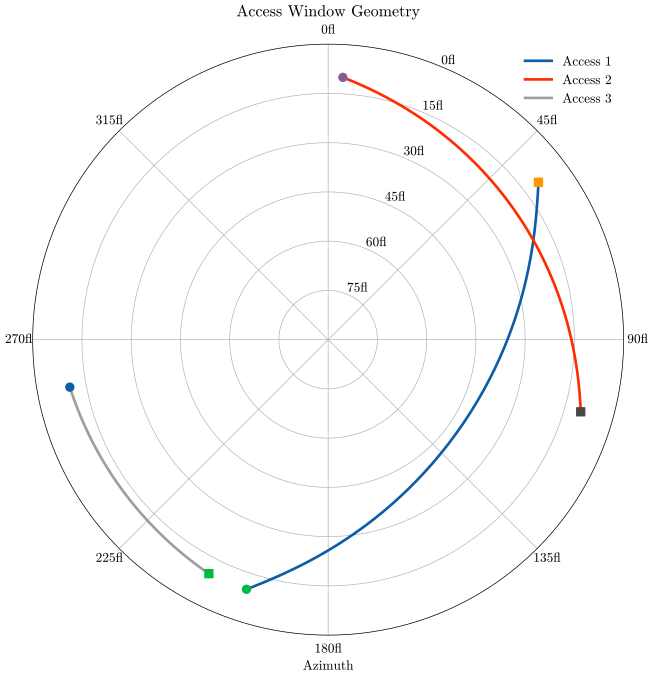
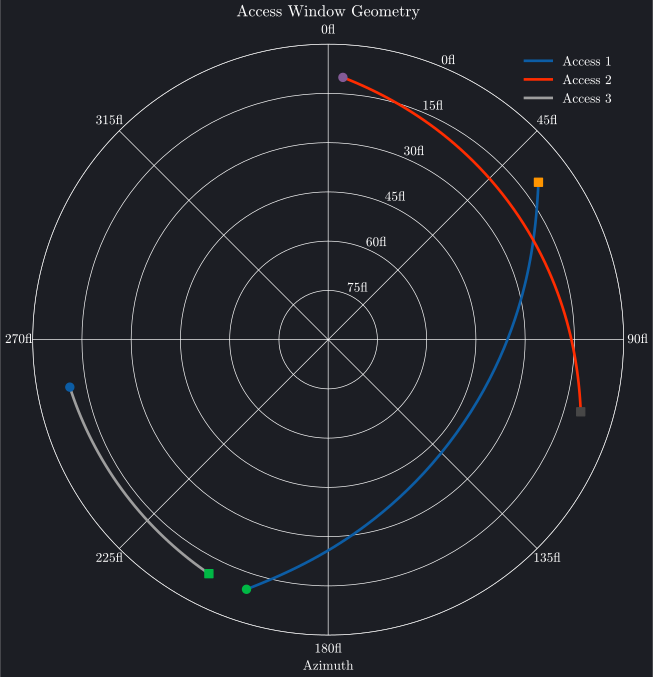
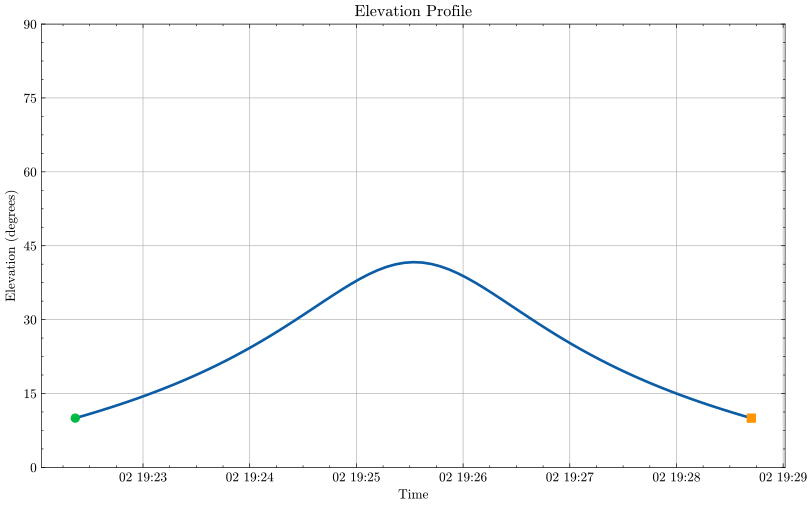
Access geometry plots visualize satellite visibility from ground stations, showing where satellites appear in the sky and how their elevation changes over time. Brahe provides three complementary views: polar plots showing azimuth and elevation, elevation vs azimuth plots showing the observed horizon, and time-series plots tracking elevation angle during passes.
All plot types support optional elevation masks to visualize terrain obstructions, antenna constraints, or other azimuth-dependent visibility limits.
Polar plots display the satellite's path across the sky in azimuth-elevation coordinates, providing an intuitive "looking up" view from the ground station.
"""Access Polar Plot Example - Plotly BackendThis script demonstrates how to create an interactive polar access plot using the plotly backend.Shows satellite azimuth and elevation during ground station passes."""importosimportpathlibimportsysimportbraheasbhimportnumpyasnp# Add plots directory to path for importing brahe_themesys.path.insert(0,str(pathlib.Path(__file__).parent.parent.parent))frombrahe_themeimportsave_themed_html# ConfigurationSCRIPT_NAME=pathlib.Path(__file__).stemOUTDIR=pathlib.Path(os.getenv("BRAHE_FIGURE_OUTPUT_DIR","./docs/figures/"))os.makedirs(OUTDIR,exist_ok=True)# Initialize EOP databh.initialize_eop()# ISS TLE for November 3, 2025tle_line0="ISS (ZARYA)"tle_line1="1 25544U 98067A 25306.42331346 .00010070 00000-0 18610-3 0 9999"tle_line2="2 25544 51.6344 342.0717 0004969 8.9436 351.1640 15.49700017536601"# Create SGP4 propagatorprop=bh.SGPPropagator.from_3le(tle_line0,tle_line1,tle_line2,60.0)# Define ground station (Cape Canaveral)lat=np.radians(28.3922)# Latitude in radianslon=np.radians(-80.6077)# Longitude in radiansalt=0.0# Altitude in metersstation=bh.PointLocation(lat,lon,alt).with_name("Cape Canaveral")# Define time range (one day to capture multiple passes)epoch=prop.epochduration=24.0*3600.0# 24 hours in seconds# Compute access windowsconstraint=bh.ElevationConstraint(min_elevation_deg=10.0)accesses=bh.location_accesses([station],[prop],epoch,epoch+duration,constraint)# Create polar access plotiflen(accesses)>0:# Use first 3 access windowsnum_windows=min(3,len(accesses))windows_to_plot=[{"access_window":accesses[i],"label":f"Access {i+1}"}foriinrange(num_windows)]fig=bh.plot_access_polar(windows_to_plot,prop,# Propagator for interpolationmin_elevation=10.0,backend="plotly",)# Save themed HTML fileslight_path,dark_path=save_themed_html(fig,OUTDIR/SCRIPT_NAME)print(f"✓ Generated {light_path}")print(f"✓ Generated {dark_path}")else:print("No access windows found in the specified time range")
"""Access Polar Plot Example - Matplotlib BackendThis script demonstrates how to create a polar access plot using the matplotlib backend.Shows satellite azimuth and elevation during ground station passes."""importbraheasbhimportnumpyasnpimportmatplotlib.pyplotasplt# Initialize EOP databh.initialize_eop()# ISS TLE for November 3, 2025tle_line0="ISS (ZARYA)"tle_line1="1 25544U 98067A 25306.42331346 .00010070 00000-0 18610-3 0 9999"tle_line2="2 25544 51.6344 342.0717 0004969 8.9436 351.1640 15.49700017536601"# Create SGP4 propagatorprop=bh.SGPPropagator.from_3le(tle_line0,tle_line1,tle_line2,60.0)# Define ground station (Cape Canaveral)lat=np.radians(28.3922)# Latitude in radianslon=np.radians(-80.6077)# Longitude in radiansalt=0.0# Altitude in metersstation=bh.PointLocation(lat,lon,alt).with_name("Cape Canaveral")# Define time range (one day to capture multiple passes)epoch=prop.epochduration=24.0*3600.0# 24 hours in seconds# Compute access windowsconstraint=bh.ElevationConstraint(min_elevation_deg=10.0)accesses=bh.location_accesses([station],[prop],epoch,epoch+duration,constraint)# Create polar access plots (light and dark mode)iflen(accesses)>0:# Use first 3 access windowsnum_windows=min(3,len(accesses))windows_to_plot=[{"access_window":accesses[i],"label":f"Access {i+1}"}foriinrange(num_windows)]# Light modefig=bh.plot_access_polar(windows_to_plot,prop,# Propagator for interpolationmin_elevation=10.0,backend="matplotlib",)# Save light mode figurefig.savefig("docs/figures/plot_access_polar_matplotlib_light.svg",dpi=300,bbox_inches="tight",)print("Access polar plot (matplotlib, light mode) saved to: docs/figures/plot_access_polar_matplotlib_light.svg")plt.close(fig)# Dark modewithplt.style.context("dark_background"):fig=bh.plot_access_polar(windows_to_plot,prop,# Propagator for interpolationmin_elevation=10.0,backend="matplotlib",)# Set background color to match Plotly dark themefig.patch.set_facecolor("#1c1e24")foraxinfig.get_axes():ax.set_facecolor("#1c1e24")# Save dark mode figurefig.savefig("docs/figures/plot_access_polar_matplotlib_dark.svg",dpi=300,bbox_inches="tight",)print("Access polar plot (matplotlib, dark mode) saved to: docs/figures/plot_access_polar_matplotlib_dark.svg")plt.close(fig)else:print("No access windows found in the specified time range")
The polar plot shows:
Radial axis: Elevation angle (0° at edge, 90° at center)
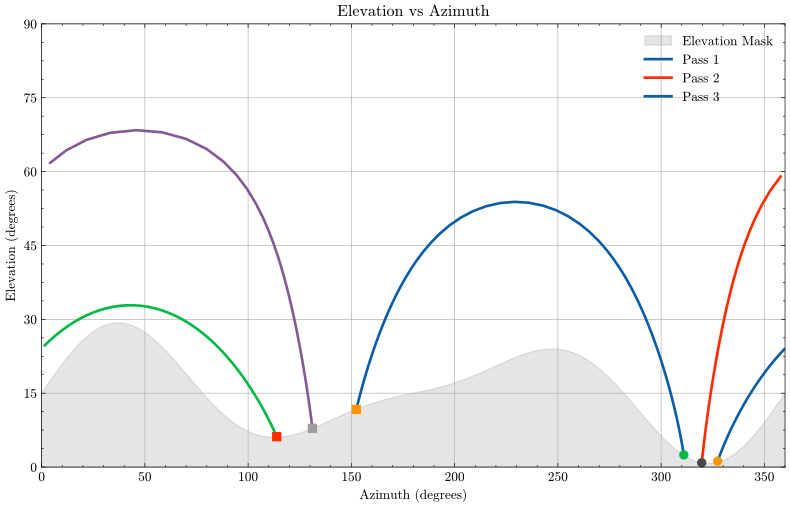
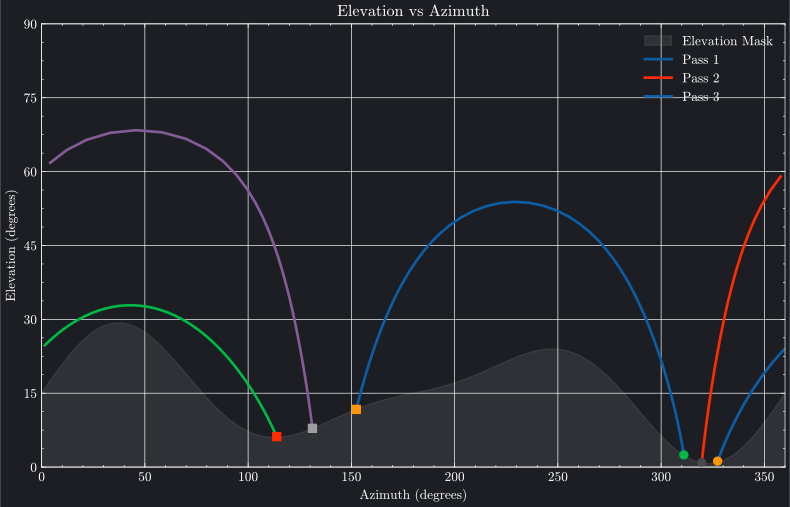
Elevation vs azimuth plots show satellite paths across the observed horizon, with azimuth on the X-axis and elevation on the Y-axis. This view is particularly useful for visualizing terrain obstructions and azimuth-dependent visibility constraints using elevation masks.
"""Access Elevation vs Azimuth Plot Example - Plotly BackendThis script demonstrates how to create an interactive elevation vs azimuth plot using the plotly backend.Shows the satellite's trajectory across the observed horizon with a sinusoidal elevation mask."""importosimportpathlibimportsysimportbraheasbhimportnumpyasnp# Add plots directory to path for importing brahe_themesys.path.insert(0,str(pathlib.Path(__file__).parent.parent.parent))frombrahe_themeimportsave_themed_html# ConfigurationSCRIPT_NAME=pathlib.Path(__file__).stemOUTDIR=pathlib.Path(os.getenv("BRAHE_FIGURE_OUTPUT_DIR","./docs/figures/"))os.makedirs(OUTDIR,exist_ok=True)# Initialize EOP databh.initialize_eop()# ISS TLE for November 3, 2025tle_line0="ISS (ZARYA)"tle_line1="1 25544U 98067A 25306.42331346 .00010070 00000-0 18610-3 0 9999"tle_line2="2 25544 51.6344 342.0717 0004969 8.9436 351.1640 15.49700017536601"# Create SGP4 propagatorprop=bh.SGPPropagator.from_3le(tle_line0,tle_line1,tle_line2,60.0)# Define ground station (Cape Canaveral)lat=28.4740# Latitude in degreeslon=-80.5772# Longitude in degreesalt=0.0# Altitude in metersstation=bh.PointLocation(lon,lat,alt).with_name("Cape Canaveral")# Define time range (one day to capture multiple passes)epoch=prop.epochduration=7.0*24.0*3600.0# 24 hours in seconds# Define sinusoidal elevation mask: 15° + 10° * sin(2*azimuth)# This varies between 5° and 25° around the horizondefelevation_mask(az):return15.0+10.0*np.sin(np.radians(2*az))+5.0*np.sin(np.radians(3*az))# Create ElevationMaskConstraint from the sinusoidal mask function# Sample the mask at 36 points around the horizon (every 10 degrees)mask_azimuths=np.arange(0,360,10)mask_points=[(az,elevation_mask(az))forazinmask_azimuths]constraint=bh.ElevationMaskConstraint(mask_points)# Compute access windows using the elevation mask constraintaccesses=bh.location_accesses([station],[prop],epoch,epoch+duration,constraint)print(f"Computed {len(accesses)} access windows")# Filter for passes longer than 5 minutes (300 seconds) to show complete passesmin_duration=300.0# secondslong_passes=[accforaccinaccessesifacc.duration>min_duration]print(f"Filtered to {len(long_passes)} long passes (> {min_duration} seconds)")# Create elevation vs azimuth plotiflen(long_passes)>0:# Use first 3 long passes for better visualizationpasses=long_passes[:min(3,len(long_passes))]window_configs=[{"access_window":passes[i],"label":f"Pass {i+1}"}foriinrange(len(passes))]fig=bh.plot_access_elevation_azimuth(window_configs,prop,# Propagator for interpolationelevation_mask=elevation_mask,backend="plotly",)# Save themed HTML fileslight_path,dark_path=save_themed_html(fig,OUTDIR/SCRIPT_NAME)print(f"✓ Generated {light_path}")print(f"✓ Generated {dark_path}")else:print("No access windows found in the specified time range")
"""Access Elevation vs Azimuth Plot Example - Matplotlib BackendThis script demonstrates how to create an elevation vs azimuth plot using the matplotlib backend.Shows the satellite's trajectory across the observed horizon with a sinusoidal elevation mask."""importbraheasbhimportnumpyasnpimportmatplotlib.pyplotasplt# Initialize EOP databh.initialize_eop()# ISS TLE for November 3, 2025tle_line0="ISS (ZARYA)"tle_line1="1 25544U 98067A 25306.42331346 .00010070 00000-0 18610-3 0 9999"tle_line2="2 25544 51.6344 342.0717 0004969 8.9436 351.1640 15.49700017536601"# Create SGP4 propagatorprop=bh.SGPPropagator.from_3le(tle_line0,tle_line1,tle_line2,60.0)# Define ground station (Cape Canaveral)lat=28.4740# Latitude in degreeslon=-80.5772# Longitude in degreesalt=0.0# Altitude in metersstation=bh.PointLocation(lon,lat,alt).with_name("Cape Canaveral")# Define time range (one day to capture multiple passes)epoch=prop.epochduration=7.0*24.0*3600.0# 24 hours in seconds# Define sinusoidal elevation mask: 15° + 10° * sin(2*azimuth)# This varies between 5° and 25° around the horizondefelevation_mask(az):return15.0+10.0*np.sin(np.radians(2*az))+5.0*np.sin(np.radians(3*az))# Create ElevationMaskConstraint from the sinusoidal mask function# Sample the mask at 36 points around the horizon (every 10 degrees)mask_azimuths=np.arange(0,360,10)mask_points=[(az,elevation_mask(az))forazinmask_azimuths]constraint=bh.ElevationMaskConstraint(mask_points)# Compute access windows using the elevation mask constraintaccesses=bh.location_accesses([station],[prop],epoch,epoch+duration,constraint)print(f"Computed {len(accesses)} access windows")# Filter for passes longer than 5 minutes (300 seconds) to show complete passesmin_duration=300.0# secondslong_passes=[accforaccinaccessesifacc.duration>min_duration]print(f"Filtered to {len(long_passes)} long passes (> {min_duration} seconds)")# Create elevation vs azimuth plots (light and dark mode)iflen(long_passes)>0:# Use first 3 long passes for better visualizationpasses=long_passes[:min(3,len(long_passes))]window_configs=[{"access_window":passes[i],"label":f"Pass {i+1}"}foriinrange(len(passes))]# Light modefig=bh.plot_access_elevation_azimuth(window_configs,prop,# Propagator for interpolationelevation_mask=elevation_mask,backend="matplotlib",)fig.savefig("docs/figures/plot_access_elevation_azimuth_matplotlib_light.svg",dpi=300,bbox_inches="tight",)print("Access elevation vs azimuth plot (matplotlib, light mode) saved to: ""docs/figures/plot_access_elevation_azimuth_matplotlib_light.svg")plt.close(fig)# Dark modewithplt.style.context("dark_background"):fig=bh.plot_access_elevation_azimuth(window_configs,prop,# Propagator for interpolationelevation_mask=elevation_mask,backend="matplotlib",)# Set background color to match Plotly dark themefig.patch.set_facecolor("#1c1e24")foraxinfig.get_axes():ax.set_facecolor("#1c1e24")fig.savefig("docs/figures/plot_access_elevation_azimuth_matplotlib_dark.svg",dpi=300,bbox_inches="tight",)print("Access elevation vs azimuth plot (matplotlib, dark mode) saved to: ""docs/figures/plot_access_elevation_azimuth_matplotlib_dark.svg")plt.close(fig)else:print("No access windows found in the specified time range")
The elevation vs azimuth plot shows:
X-axis: Azimuth angle (0° to 360°, North = 0°/360°)
Y-axis: Elevation angle (0° to 90°)
Satellite trajectory: Path across the sky from observer's perspective
Elevation mask (shaded region): Visibility constraints varying with azimuth
Discontinuity handling: Trajectories crossing 0°/360° azimuth are split to avoid artifacts
# Constant elevation (simple value)fig=bh.plot_access_elevation_azimuth(windows,prop,elevation_mask=10.0,# 10° everywherebackend="matplotlib")# Function of azimuth (variable constraint)mask_fn=lambdaaz:15.0+10.0*np.sin(np.radians(2*az))fig=bh.plot_access_elevation_azimuth(windows,prop,elevation_mask=mask_fn,backend="matplotlib")# Array of values (measured terrain profile)azimuths=np.linspace(0,360,361)elevations=[measured_elevation(az)forazinazimuths]fig=bh.plot_access_elevation_azimuth(windows,prop,elevation_mask=elevations,# Must match azimuth samplingbackend="matplotlib")
Elevation masks are also supported in polar plots (plot_access_polar) where they appear as shaded regions around the plot edge.
"""Access Elevation Plot Example - Plotly BackendThis script demonstrates how to create an interactive elevation vs time plot using the plotly backend.Shows satellite elevation angle during a ground station pass."""importosimportpathlibimportsysimportbraheasbhimportnumpyasnp# Add plots directory to path for importing brahe_themesys.path.insert(0,str(pathlib.Path(__file__).parent.parent.parent))frombrahe_themeimportsave_themed_html# ConfigurationSCRIPT_NAME=pathlib.Path(__file__).stemOUTDIR=pathlib.Path(os.getenv("BRAHE_FIGURE_OUTPUT_DIR","./docs/figures/"))os.makedirs(OUTDIR,exist_ok=True)# Initialize EOP databh.initialize_eop()# ISS TLE for November 3, 2025tle_line0="ISS (ZARYA)"tle_line1="1 25544U 98067A 25306.42331346 .00010070 00000-0 18610-3 0 9999"tle_line2="2 25544 51.6344 342.0717 0004969 8.9436 351.1640 15.49700017536601"# Create SGP4 propagatorprop=bh.SGPPropagator.from_3le(tle_line0,tle_line1,tle_line2,60.0)# Define ground station (Cape Canaveral)lat=np.radians(28.3922)# Latitude in radianslon=np.radians(-80.6077)# Longitude in radiansalt=0.0# Altitude in metersstation=bh.PointLocation(lat,lon,alt).with_name("Cape Canaveral")# Define time range (one day to capture multiple passes)epoch=prop.epochduration=24.0*3600.0# 24 hours in seconds# Compute access windowsconstraint=bh.ElevationConstraint(min_elevation_deg=10.0)accesses=bh.location_accesses([station],[prop],epoch,epoch+duration,constraint)# Create elevation plotiflen(accesses)>0:fig=bh.plot_access_elevation([{"access_window":accesses[0]}],# Use first access windowprop,# Propagator for interpolationbackend="plotly",)# Save themed HTML fileslight_path,dark_path=save_themed_html(fig,OUTDIR/SCRIPT_NAME)print(f"✓ Generated {light_path}")print(f"✓ Generated {dark_path}")else:print("No access windows found in the specified time range")
"""Access Elevation Plot Example - Matplotlib BackendThis script demonstrates how to create an elevation vs time plot using the matplotlib backend.Shows satellite elevation angle during a ground station pass."""importbraheasbhimportnumpyasnpimportmatplotlib.pyplotasplt# Initialize EOP databh.initialize_eop()# ISS TLE for November 3, 2025tle_line0="ISS (ZARYA)"tle_line1="1 25544U 98067A 25306.42331346 .00010070 00000-0 18610-3 0 9999"tle_line2="2 25544 51.6344 342.0717 0004969 8.9436 351.1640 15.49700017536601"# Create SGP4 propagatorprop=bh.SGPPropagator.from_3le(tle_line0,tle_line1,tle_line2,60.0)# Define ground station (Cape Canaveral)lat=np.radians(28.3922)# Latitude in radianslon=np.radians(-80.6077)# Longitude in radiansalt=0.0# Altitude in metersstation=bh.PointLocation(lat,lon,alt).with_name("Cape Canaveral")# Define time range (one day to capture multiple passes)epoch=prop.epochduration=24.0*3600.0# 24 hours in seconds# Compute access windowsconstraint=bh.ElevationConstraint(min_elevation_deg=10.0)accesses=bh.location_accesses([station],[prop],epoch,epoch+duration,constraint)# Create elevation plots (light and dark mode)iflen(accesses)>0:# Light modefig=bh.plot_access_elevation([{"access_window":accesses[0]}],# Use first access windowprop,# Propagator for interpolationbackend="matplotlib",)# Save light mode figurefig.savefig("docs/figures/plot_access_elevation_matplotlib_light.svg",dpi=300,bbox_inches="tight",)print("Access elevation plot (matplotlib, light mode) saved to: docs/figures/plot_access_elevation_matplotlib_light.svg")plt.close(fig)# Dark modewithplt.style.context("dark_background"):fig=bh.plot_access_elevation([{"access_window":accesses[0]}],# Use first access windowprop,# Propagator for interpolationbackend="matplotlib",)# Set background color to match Plotly dark themefig.patch.set_facecolor("#1c1e24")foraxinfig.get_axes():ax.set_facecolor("#1c1e24")# Save dark mode figurefig.savefig("docs/figures/plot_access_elevation_matplotlib_dark.svg",dpi=300,bbox_inches="tight",)print("Access elevation plot (matplotlib, dark mode) saved to: docs/figures/plot_access_elevation_matplotlib_dark.svg")plt.close(fig)else:print("No access windows found in the specified time range")