Skip to content

Estimation Plots

Brahe provides estimation-specific plotting functions for visualizing filter performance: state estimation errors with \(n\sigma\) covariance bounds, state values with uncertainty patches, measurement residuals (prefit, postfit, and RMS), and marginal distributions with covariance ellipses. All functions support multiple solver overlays for comparing filters, configurable grid layouts, and both matplotlib and plotly backends.

Switching Backends

All estimation plot functions accept a backend= parameter. Use backend="plotly" for interactive exploration and backend="matplotlib" for publication-quality static figures.

State Error Grid

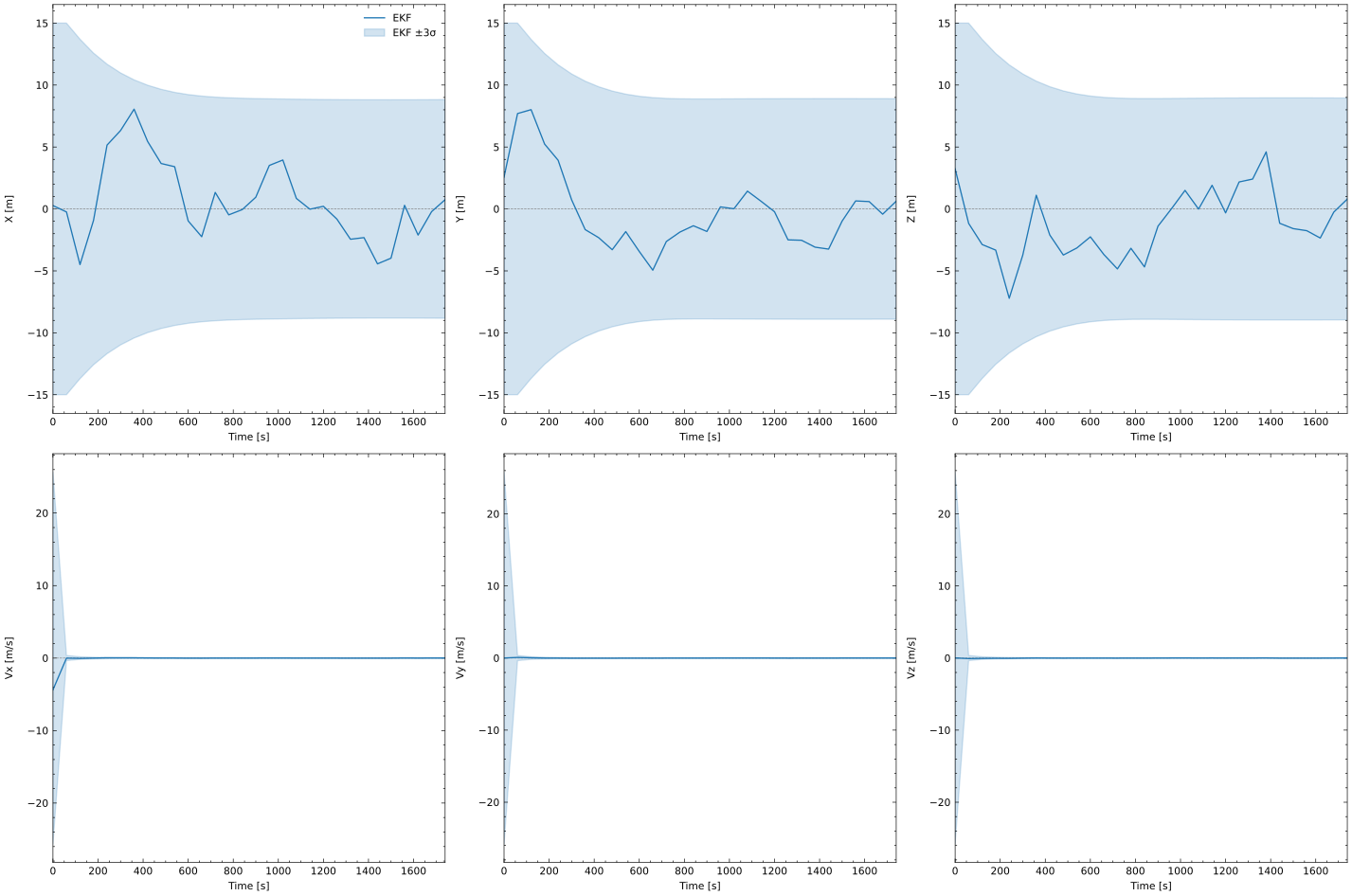
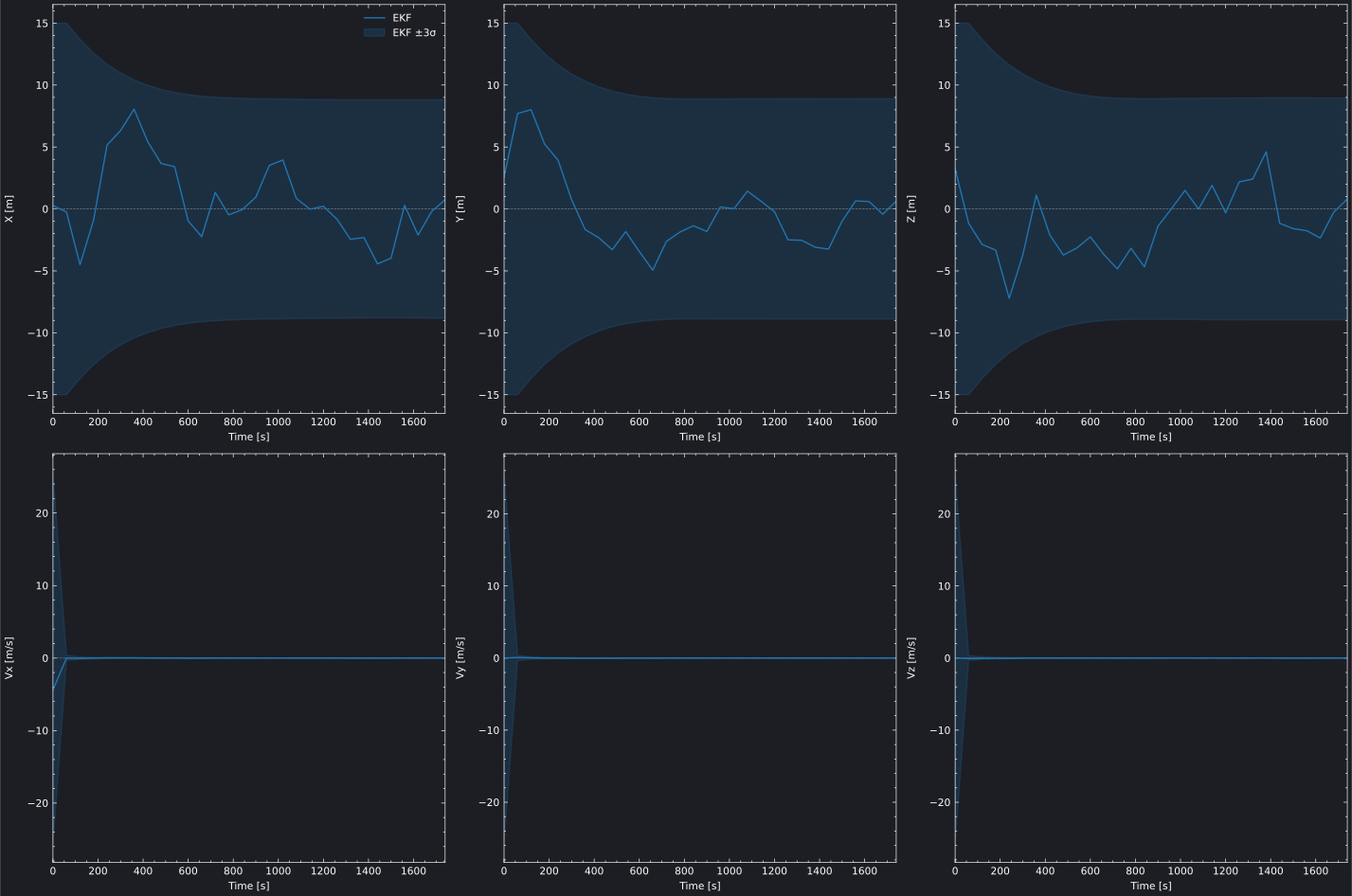
The state error grid shows the difference between estimated and true state values across all state components. When a sigma level is provided, covariance-derived uncertainty bands indicate the filter's confidence — if the error stays within the bounds, the filter is consistent.

Interactive State Error Grid (Plotly)

Plot Source
estimation_state_error_plotly.py
"""
EKF State Error Grid - Plotly Backend

Plots the estimation error (estimated minus truth) for each state component with
3-sigma covariance bands, showing EKF convergence from a perturbed initial state.
"""

import os
import pathlib
import sys
import numpy as np
import brahe as bh

# Add plots directory to path for importing brahe_theme
sys.path.insert(0, str(pathlib.Path(__file__).parent.parent.parent))
from brahe_theme import save_themed_html

# Configuration
SCRIPT_NAME = pathlib.Path(__file__).stem
OUTDIR = pathlib.Path(os.getenv("BRAHE_FIGURE_OUTPUT_DIR", "./docs/figures/"))
os.makedirs(OUTDIR, exist_ok=True)

# Initialize EOP data
bh.initialize_eop()

# Truth orbit: LEO 500 km, ISS-like inclination
epoch = bh.Epoch(2024, 1, 1, 0, 0, 0.0)
oe = np.array([bh.R_EARTH + 500e3, 0.01, np.radians(51.6), 0.0, 0.0, 0.0])
true_state = bh.state_koe_to_eci(oe, bh.AngleFormat.RADIANS)

# Truth propagator
truth_prop = bh.NumericalOrbitPropagator(
    epoch,
    true_state,
    bh.NumericalPropagationConfig.default(),
    bh.ForceModelConfig.two_body(),
)

# Generate noisy ECEF GNSS position observations
np.random.seed(42)
observations = []
for i in range(1, 31):
    t = epoch + i * 60.0
    truth_prop.propagate_to(t)
    truth_eci = truth_prop.current_state()
    truth_ecef_pos = bh.position_eci_to_ecef(t, truth_eci[:3])
    noisy_pos = truth_ecef_pos + np.random.randn(3) * 5.0
    observations.append(bh.Observation(t, noisy_pos, model_index=0))

truth_traj = truth_prop.trajectory

# EKF with perturbed initial state (+1 km in X)
initial_state = true_state.copy()
initial_state[0] += 1000.0
p0 = np.diag([1e6, 1e6, 1e6, 1e2, 1e2, 1e2])

q = np.diag([1e-4, 1e-4, 1e-4, 1e-6, 1e-6, 1e-6])
ekf_config = bh.EKFConfig(process_noise=bh.ProcessNoiseConfig(q, scale_with_dt=True))

ekf = bh.ExtendedKalmanFilter(
    epoch,
    initial_state,
    p0,
    measurement_models=[bh.ECEFPositionMeasurementModel(5.0)],
    propagation_config=bh.NumericalPropagationConfig.default(),
    force_config=bh.ForceModelConfig.two_body(),
    config=ekf_config,
)

for obs in observations:
    ekf.process_observation(obs)

# Plot state error grid
fig = bh.plot_estimator_state_error_grid(
    solvers=[ekf],
    true_trajectory=truth_traj,
    sigma=3,
    state_labels=["X [m]", "Y [m]", "Z [m]", "Vx [m/s]", "Vy [m/s]", "Vz [m/s]"],
    labels=["EKF"],
    backend="plotly",
)

# Save themed HTML files
light_path, dark_path = save_themed_html(fig, OUTDIR / SCRIPT_NAME)
print(f"✓ Generated {light_path}")
print(f"✓ Generated {dark_path}")

Static State Error Grid (Matplotlib)

State Error Grid State Error Grid
Plot Source
estimation_state_error_matplotlib.py
"""
EKF State Error Grid - Matplotlib Backend

Plots the estimation error (estimated minus truth) for each state component with
3-sigma covariance bands, showing EKF convergence from a perturbed initial state.
"""

import os
import pathlib
import numpy as np
import brahe as bh
import matplotlib.pyplot as plt

# Configuration
SCRIPT_NAME = pathlib.Path(__file__).stem
OUTDIR = pathlib.Path(os.getenv("BRAHE_FIGURE_OUTPUT_DIR", "./docs/figures/"))
os.makedirs(OUTDIR, exist_ok=True)

# Initialize EOP data
bh.initialize_eop()

# Truth orbit: LEO 500 km, ISS-like inclination
epoch = bh.Epoch(2024, 1, 1, 0, 0, 0.0)
oe = np.array([bh.R_EARTH + 500e3, 0.01, np.radians(51.6), 0.0, 0.0, 0.0])
true_state = bh.state_koe_to_eci(oe, bh.AngleFormat.RADIANS)

# Truth propagator
truth_prop = bh.NumericalOrbitPropagator(
    epoch,
    true_state,
    bh.NumericalPropagationConfig.default(),
    bh.ForceModelConfig.two_body(),
)

# Generate noisy ECEF GNSS position observations
np.random.seed(42)
observations = []
for i in range(1, 31):
    t = epoch + i * 60.0
    truth_prop.propagate_to(t)
    truth_eci = truth_prop.current_state()
    truth_ecef_pos = bh.position_eci_to_ecef(t, truth_eci[:3])
    noisy_pos = truth_ecef_pos + np.random.randn(3) * 5.0
    observations.append(bh.Observation(t, noisy_pos, model_index=0))

truth_traj = truth_prop.trajectory

# EKF with perturbed initial state (+1 km in X)
initial_state = true_state.copy()
initial_state[0] += 1000.0
p0 = np.diag([1e6, 1e6, 1e6, 1e2, 1e2, 1e2])

q = np.diag([1e-4, 1e-4, 1e-4, 1e-6, 1e-6, 1e-6])
ekf_config = bh.EKFConfig(process_noise=bh.ProcessNoiseConfig(q, scale_with_dt=True))

ekf = bh.ExtendedKalmanFilter(
    epoch,
    initial_state,
    p0,
    measurement_models=[bh.ECEFPositionMeasurementModel(5.0)],
    propagation_config=bh.NumericalPropagationConfig.default(),
    force_config=bh.ForceModelConfig.two_body(),
    config=ekf_config,
)

for obs in observations:
    ekf.process_observation(obs)

# Plot state error grid — light mode
fig = bh.plot_estimator_state_error_grid(
    solvers=[ekf],
    true_trajectory=truth_traj,
    sigma=3,
    state_labels=["X [m]", "Y [m]", "Z [m]", "Vx [m/s]", "Vy [m/s]", "Vz [m/s]"],
    labels=["EKF"],
    backend="matplotlib",
)

light_path = OUTDIR / f"{SCRIPT_NAME}_light.svg"
fig.savefig(light_path, dpi=300, bbox_inches="tight")
print(f"✓ Generated {light_path}")
plt.close(fig)

# Plot state error grid — dark mode
fig = bh.plot_estimator_state_error_grid(
    solvers=[ekf],
    true_trajectory=truth_traj,
    sigma=3,
    state_labels=["X [m]", "Y [m]", "Z [m]", "Vx [m/s]", "Vy [m/s]", "Vz [m/s]"],
    labels=["EKF"],
    backend="matplotlib",
    backend_config={"dark_mode": True},
)

dark_path = OUTDIR / f"{SCRIPT_NAME}_dark.svg"
fig.savefig(dark_path, dpi=300, bbox_inches="tight")
print(f"✓ Generated {dark_path}")
plt.close(fig)

The 2x3 grid layout (configurable via ncols) shows each state component in its own subplot. The error line should converge toward zero as the filter processes more observations. Covariance bands that shrink over time indicate the filter is gaining confidence in its estimate.

Comparing Filters (EKF vs UKF)

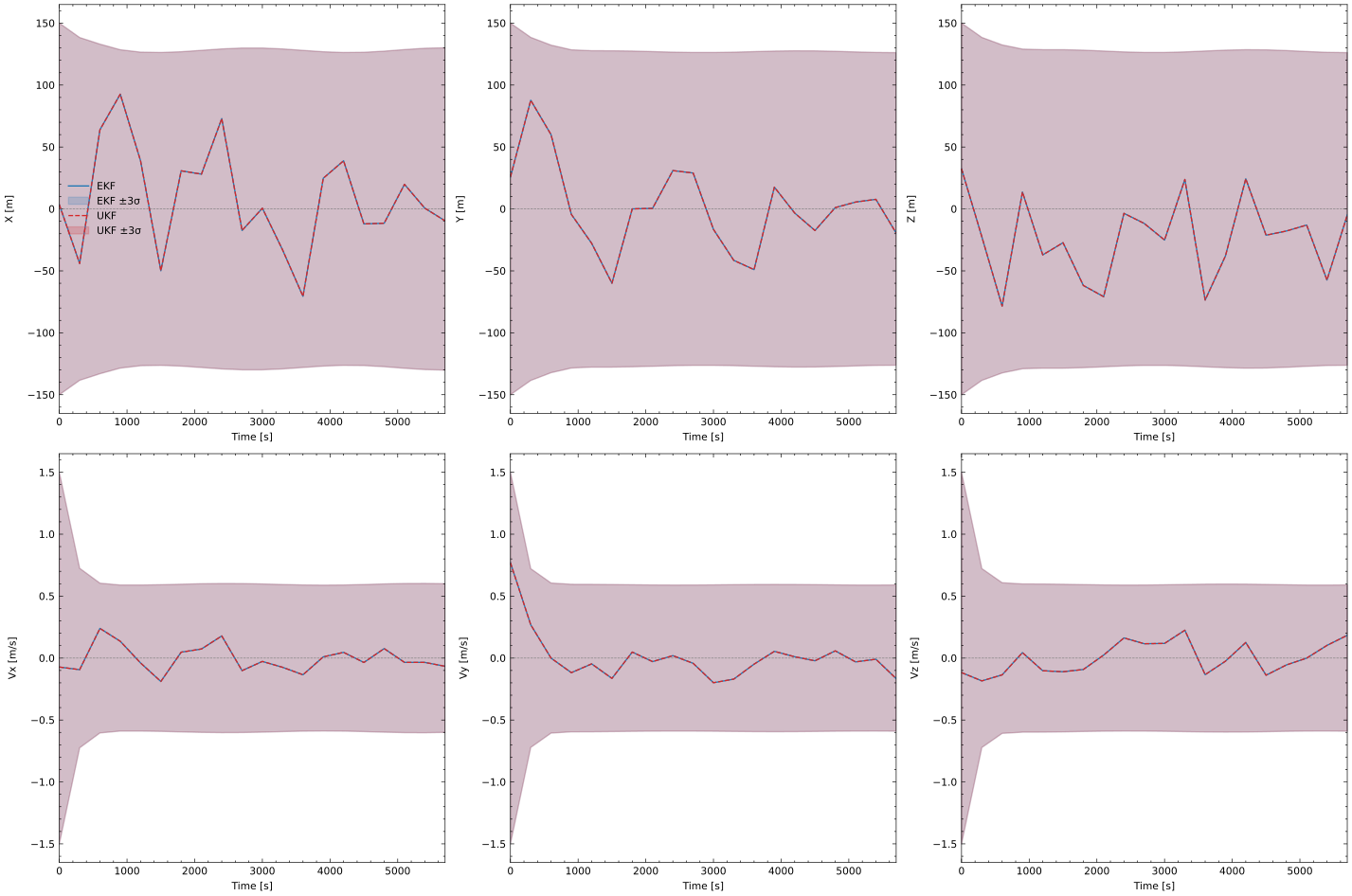
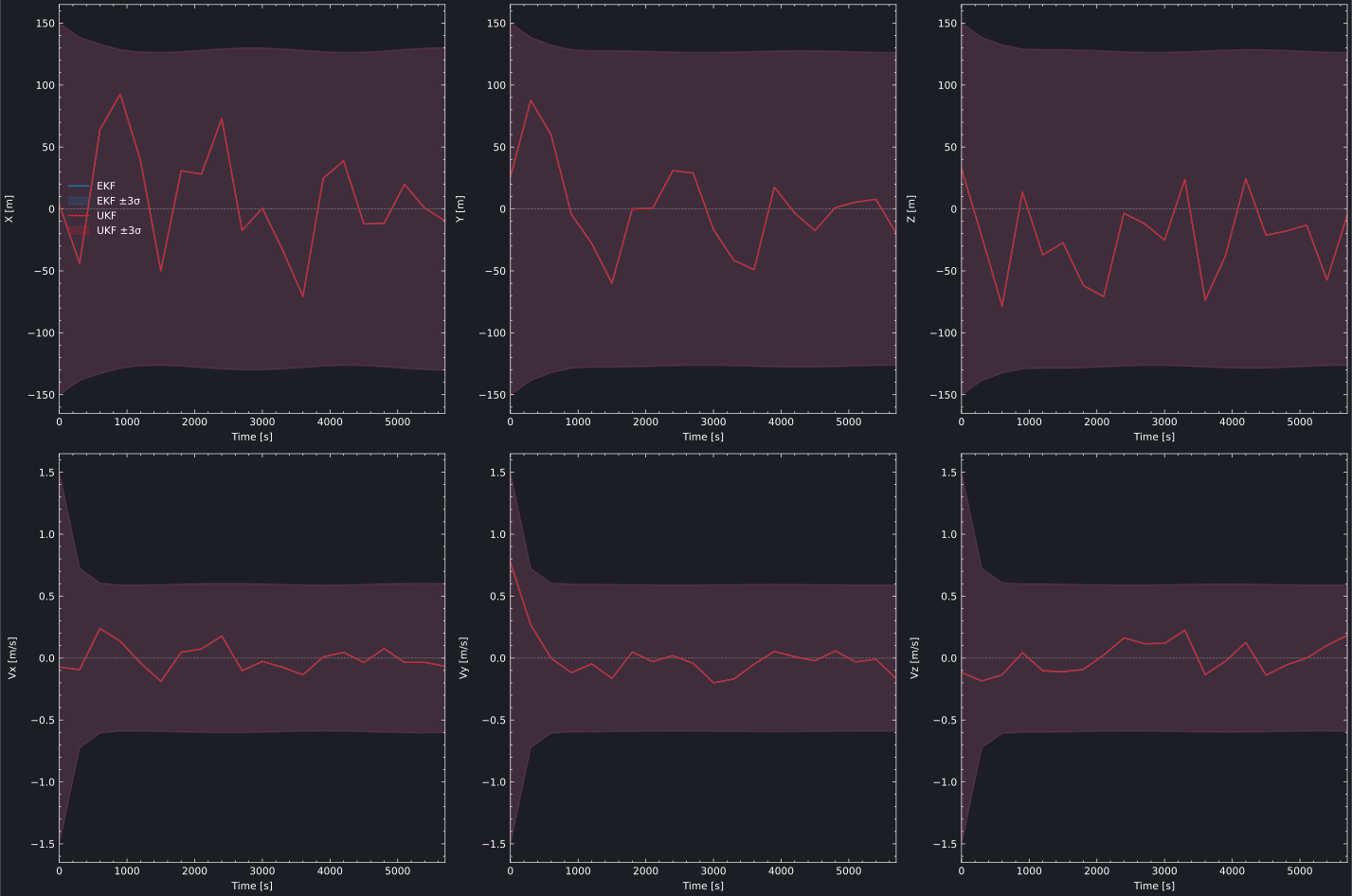
To compare multiple filters on the same grid, pass a list of solvers. This example runs both an EKF and UKF on identical observation data and overlays their state errors:

Plot Source
estimation_ekf_ukf_comparison_plotly.py
"""
EKF vs UKF State Error Comparison - Plotly Backend

Runs both an Extended Kalman Filter and Unscented Kalman Filter on the same
observation data, then overlays their state errors on a single grid for
direct comparison of filter convergence behaviour.
"""

import os
import pathlib
import sys
import numpy as np
import brahe as bh

# Add plots directory to path for importing brahe_theme
sys.path.insert(0, str(pathlib.Path(__file__).parent.parent.parent))
from brahe_theme import save_themed_html

# Configuration
SCRIPT_NAME = pathlib.Path(__file__).stem
OUTDIR = pathlib.Path(os.getenv("BRAHE_FIGURE_OUTPUT_DIR", "./docs/figures/"))
os.makedirs(OUTDIR, exist_ok=True)

# Initialize EOP data
bh.initialize_eop()
bh.initialize_sw()

# Truth orbit: LEO 500 km, ISS-like inclination
epoch = bh.Epoch(2024, 1, 1, 0, 0, 0.0)
oe = np.array([bh.R_EARTH + 500e3, 0.01, np.radians(51.6), 0.0, 0.0, 0.0])
true_state = bh.state_koe_to_eci(oe, bh.AngleFormat.RADIANS)

# Truth propagator: full force model (20x20 gravity, drag, SRP, third-body)
# params: [mass_kg, drag_area_m2, Cd, srp_area_m2, Cr]
true_params = np.array([1000.0, 10.0, 2.2, 10.0, 1.3])
truth_prop = bh.NumericalOrbitPropagator(
    epoch,
    true_state,
    bh.NumericalPropagationConfig.default(),
    bh.ForceModelConfig.default(),
    params=true_params,
)

# Generate noisy ECEF position+velocity observations every 5 minutes
# Wider spacing lets dynamics nonlinearity accumulate between updates
np.random.seed(42)
observations = []
for i in range(1, 21):
    t = epoch + i * 300.0
    truth_prop.propagate_to(t)
    truth_eci = truth_prop.current_state()
    truth_ecef = bh.state_eci_to_ecef(t, truth_eci)
    noisy_state = truth_ecef.copy()
    noisy_state[:3] += np.random.randn(3) * 50.0
    noisy_state[3:] += np.random.randn(3) * 0.5
    observations.append(bh.Observation(t, noisy_state, model_index=0))

truth_traj = truth_prop.trajectory

# Shared initial conditions: large perturbation (+50 km in X, +10 m/s in Vy)
# to stress-test linearization and reveal EKF vs UKF differences
initial_state = true_state.copy()
initial_state[0] += 50e3
initial_state[4] += 10.0
p0 = np.diag([1e8, 1e8, 1e8, 1e4, 1e4, 1e4])

q = np.diag([1e-2, 1e-2, 1e-2, 1e-4, 1e-4, 1e-4])

# Both filters use 5x5 gravity only (no drag/SRP) — model mismatch with truth
filter_force = bh.ForceModelConfig(gravity=bh.GravityConfiguration(degree=5, order=5))

# EKF
ekf_config = bh.EKFConfig(process_noise=bh.ProcessNoiseConfig(q, scale_with_dt=True))
ekf = bh.ExtendedKalmanFilter(
    epoch,
    initial_state,
    p0,
    measurement_models=[bh.ECEFStateMeasurementModel(50.0, 0.5)],
    propagation_config=bh.NumericalPropagationConfig.default(),
    force_config=filter_force,
    config=ekf_config,
)

for obs in observations:
    ekf.process_observation(obs)

# UKF (same initial conditions and process noise)
ukf_config = bh.UKFConfig(process_noise=bh.ProcessNoiseConfig(q, scale_with_dt=True))
ukf = bh.UnscentedKalmanFilter(
    epoch,
    initial_state,
    p0,
    measurement_models=[bh.ECEFStateMeasurementModel(50.0, 0.5)],
    propagation_config=bh.NumericalPropagationConfig.default(),
    force_config=filter_force,
    config=ukf_config,
)

for obs in observations:
    ukf.process_observation(obs)

# Plot both filters on the same grid
fig = bh.plot_estimator_state_error_grid(
    solvers=[ekf, ukf],
    true_trajectory=truth_traj,
    sigma=3,
    state_labels=["X [m]", "Y [m]", "Z [m]", "Vx [m/s]", "Vy [m/s]", "Vz [m/s]"],
    labels=["EKF", "UKF"],
    colors=["#1f77b4", "#d62728"],
    backend="plotly",
)

# Save themed HTML files
light_path, dark_path = save_themed_html(fig, OUTDIR / SCRIPT_NAME)
print(f"✓ Generated {light_path}")
print(f"✓ Generated {dark_path}")
EKF vs UKF Comparison EKF vs UKF Comparison
Plot Source
estimation_ekf_ukf_comparison_matplotlib.py
"""
EKF vs UKF State Error Comparison - Matplotlib Backend

Runs both an Extended Kalman Filter and Unscented Kalman Filter on the same
observation data, then overlays their state errors on a single grid for
direct comparison of filter convergence behaviour.
"""

import os
import pathlib
import numpy as np
import brahe as bh
import matplotlib.pyplot as plt

# Configuration
SCRIPT_NAME = pathlib.Path(__file__).stem
OUTDIR = pathlib.Path(os.getenv("BRAHE_FIGURE_OUTPUT_DIR", "./docs/figures/"))
os.makedirs(OUTDIR, exist_ok=True)

# Initialize EOP data
bh.initialize_eop()
bh.initialize_sw()

# Truth orbit: LEO 500 km, ISS-like inclination
epoch = bh.Epoch(2024, 1, 1, 0, 0, 0.0)
oe = np.array([bh.R_EARTH + 500e3, 0.01, np.radians(51.6), 0.0, 0.0, 0.0])
true_state = bh.state_koe_to_eci(oe, bh.AngleFormat.RADIANS)

# Truth propagator: full force model (20x20 gravity, drag, SRP, third-body)
# params: [mass_kg, drag_area_m2, Cd, srp_area_m2, Cr]
true_params = np.array([1000.0, 10.0, 2.2, 10.0, 1.3])
truth_prop = bh.NumericalOrbitPropagator(
    epoch,
    true_state,
    bh.NumericalPropagationConfig.default(),
    bh.ForceModelConfig.default(),
    params=true_params,
)

# Generate noisy ECEF position+velocity observations every 5 minutes
# Wider spacing lets dynamics nonlinearity accumulate between updates
np.random.seed(42)
observations = []
for i in range(1, 21):
    t = epoch + i * 300.0
    truth_prop.propagate_to(t)
    truth_eci = truth_prop.current_state()
    truth_ecef = bh.state_eci_to_ecef(t, truth_eci)
    noisy_state = truth_ecef.copy()
    noisy_state[:3] += np.random.randn(3) * 50.0
    noisy_state[3:] += np.random.randn(3) * 0.5
    observations.append(bh.Observation(t, noisy_state, model_index=0))

truth_traj = truth_prop.trajectory

# Shared initial conditions: large perturbation (+50 km in X, +10 m/s in Vy)
# to stress-test linearization and reveal EKF vs UKF differences
initial_state = true_state.copy()
initial_state[0] += 50e3
initial_state[4] += 10.0
p0 = np.diag([1e8, 1e8, 1e8, 1e4, 1e4, 1e4])

q = np.diag([1e-2, 1e-2, 1e-2, 1e-4, 1e-4, 1e-4])

# Both filters use 5x5 gravity only (no drag/SRP) — model mismatch with truth
filter_force = bh.ForceModelConfig(gravity=bh.GravityConfiguration(degree=5, order=5))

# EKF
ekf_config = bh.EKFConfig(process_noise=bh.ProcessNoiseConfig(q, scale_with_dt=True))
ekf = bh.ExtendedKalmanFilter(
    epoch,
    initial_state,
    p0,
    measurement_models=[bh.ECEFStateMeasurementModel(50.0, 0.5)],
    propagation_config=bh.NumericalPropagationConfig.default(),
    force_config=filter_force,
    config=ekf_config,
)

for obs in observations:
    ekf.process_observation(obs)

# UKF (same initial conditions and process noise)
ukf_config = bh.UKFConfig(process_noise=bh.ProcessNoiseConfig(q, scale_with_dt=True))
ukf = bh.UnscentedKalmanFilter(
    epoch,
    initial_state,
    p0,
    measurement_models=[bh.ECEFStateMeasurementModel(50.0, 0.5)],
    propagation_config=bh.NumericalPropagationConfig.default(),
    force_config=filter_force,
    config=ukf_config,
)

for obs in observations:
    ukf.process_observation(obs)

# Plot both filters on the same grid — light mode
fig = bh.plot_estimator_state_error_grid(
    solvers=[ekf, ukf],
    true_trajectory=truth_traj,
    sigma=3,
    state_labels=["X [m]", "Y [m]", "Z [m]", "Vx [m/s]", "Vy [m/s]", "Vz [m/s]"],
    labels=["EKF", "UKF"],
    colors=["#1f77b4", "#d62728"],
    backend="matplotlib",
)

light_path = OUTDIR / f"{SCRIPT_NAME}_light.svg"
fig.savefig(light_path, dpi=300, bbox_inches="tight")
print(f"✓ Generated {light_path}")
plt.close(fig)

# Plot both filters on the same grid — dark mode
fig = bh.plot_estimator_state_error_grid(
    solvers=[ekf, ukf],
    true_trajectory=truth_traj,
    sigma=3,
    state_labels=["X [m]", "Y [m]", "Z [m]", "Vx [m/s]", "Vy [m/s]", "Vz [m/s]"],
    labels=["EKF", "UKF"],
    colors=["#1f77b4", "#d62728"],
    backend="matplotlib",
    backend_config={"dark_mode": True},
)

dark_path = OUTDIR / f"{SCRIPT_NAME}_dark.svg"
fig.savefig(dark_path, dpi=300, bbox_inches="tight")
print(f"✓ Generated {dark_path}")
plt.close(fig)

State Value Grid

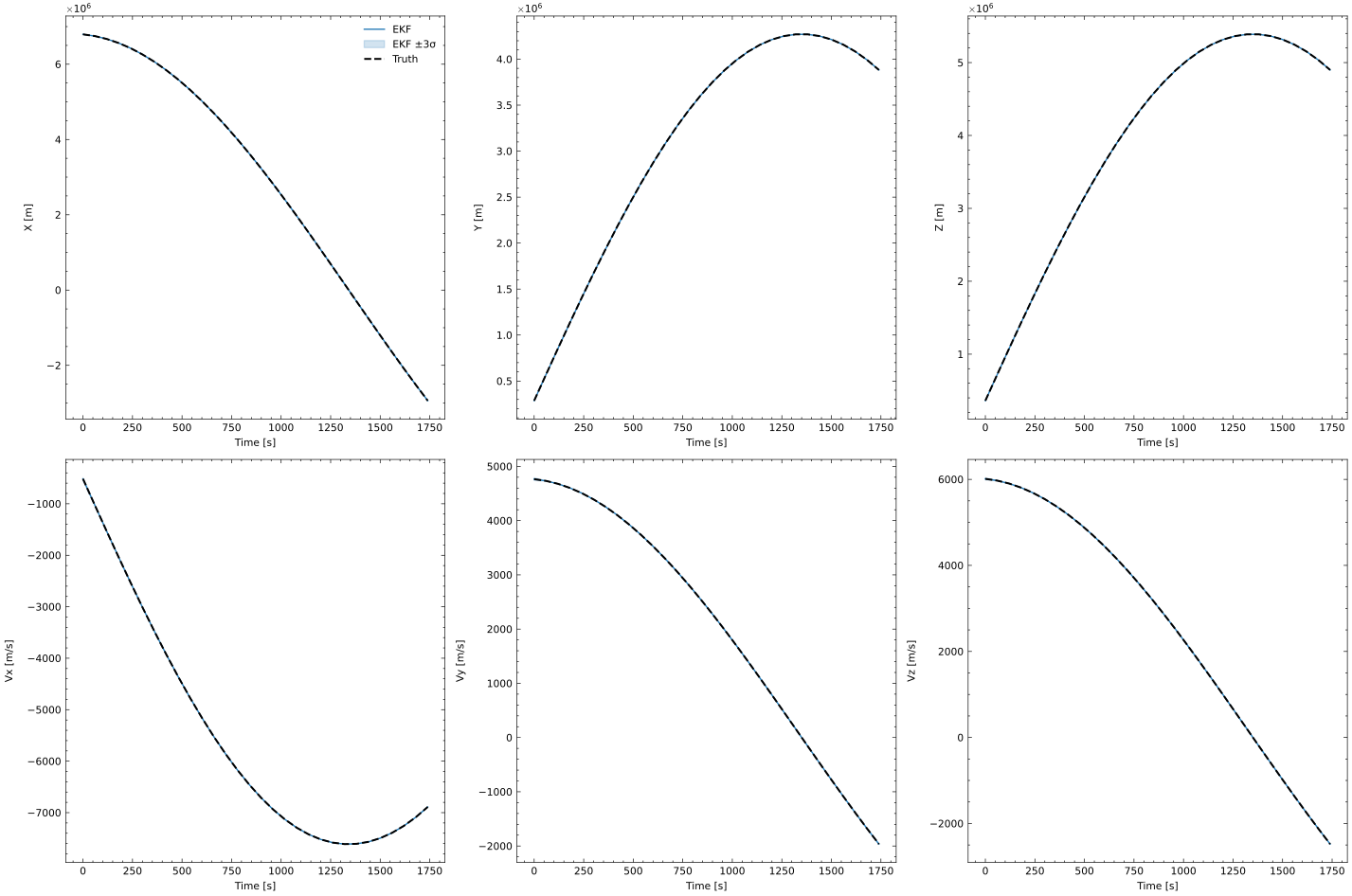
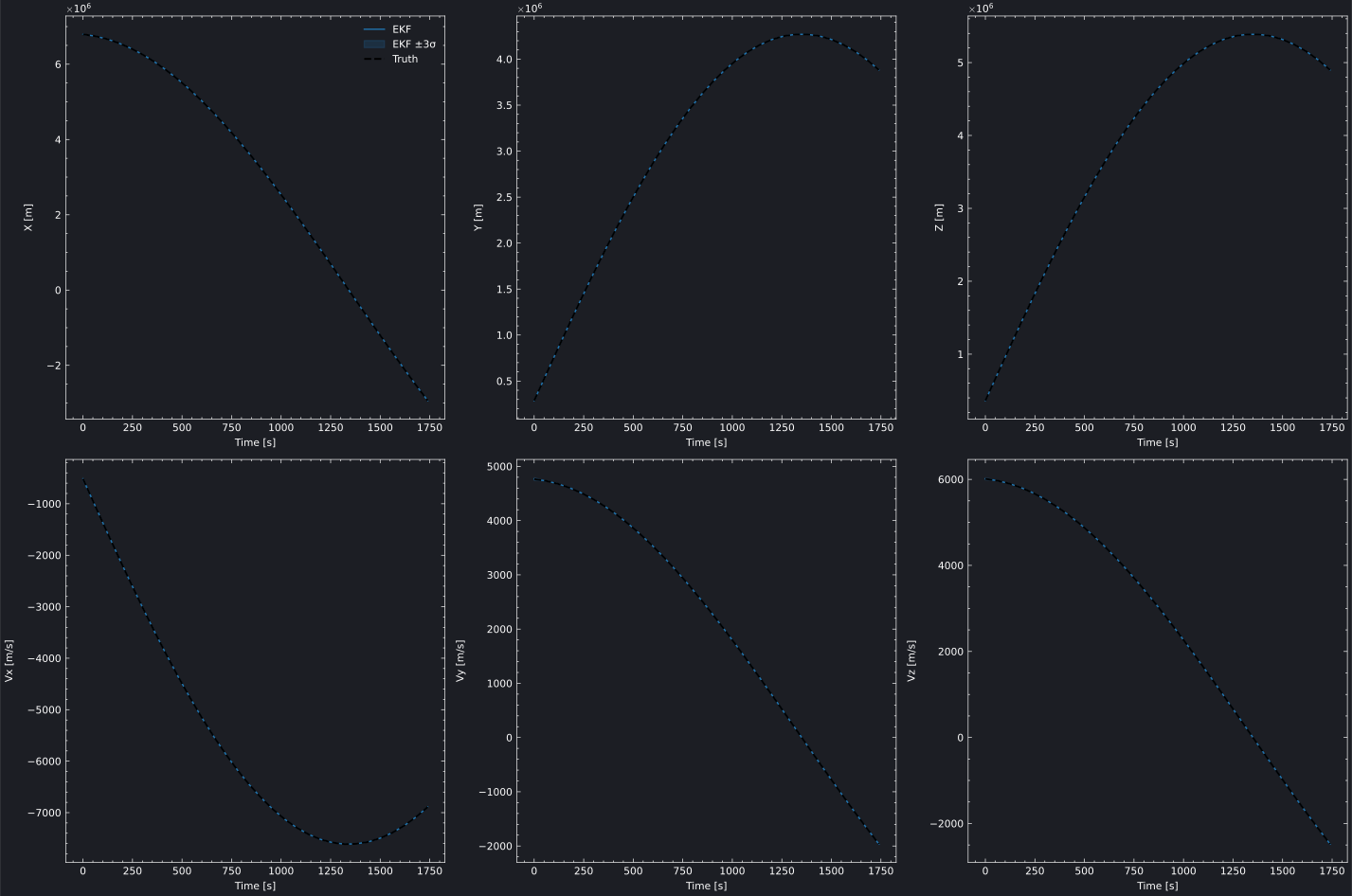
The state value grid plots the actual estimated state values with a dashed truth reference line. Optional uncertainty patches show the \(\pm n\sigma\) envelope around the estimate — useful for seeing how the estimated trajectory tracks the truth.

Interactive State Value Grid (Plotly)

Plot Source
estimation_state_value_plotly.py
"""
EKF State Value Grid - Plotly Backend

Plots the estimated state values with truth reference lines and 3-sigma
uncertainty patches, showing EKF convergence from a perturbed initial state.
"""

import os
import pathlib
import sys
import numpy as np
import brahe as bh

# Add plots directory to path for importing brahe_theme
sys.path.insert(0, str(pathlib.Path(__file__).parent.parent.parent))
from brahe_theme import save_themed_html

# Configuration
SCRIPT_NAME = pathlib.Path(__file__).stem
OUTDIR = pathlib.Path(os.getenv("BRAHE_FIGURE_OUTPUT_DIR", "./docs/figures/"))
os.makedirs(OUTDIR, exist_ok=True)

# Initialize EOP data
bh.initialize_eop()

# Truth orbit: LEO 500 km, ISS-like inclination
epoch = bh.Epoch(2024, 1, 1, 0, 0, 0.0)
oe = np.array([bh.R_EARTH + 500e3, 0.01, np.radians(51.6), 0.0, 0.0, 0.0])
true_state = bh.state_koe_to_eci(oe, bh.AngleFormat.RADIANS)

# Truth propagator
truth_prop = bh.NumericalOrbitPropagator(
    epoch,
    true_state,
    bh.NumericalPropagationConfig.default(),
    bh.ForceModelConfig.two_body(),
)

# Generate noisy ECEF GNSS position observations
np.random.seed(42)
observations = []
for i in range(1, 31):
    t = epoch + i * 60.0
    truth_prop.propagate_to(t)
    truth_eci = truth_prop.current_state()
    truth_ecef_pos = bh.position_eci_to_ecef(t, truth_eci[:3])
    noisy_pos = truth_ecef_pos + np.random.randn(3) * 5.0
    observations.append(bh.Observation(t, noisy_pos, model_index=0))

truth_traj = truth_prop.trajectory

# EKF with perturbed initial state (+1 km in X)
initial_state = true_state.copy()
initial_state[0] += 1000.0
p0 = np.diag([1e6, 1e6, 1e6, 1e2, 1e2, 1e2])

q = np.diag([1e-4, 1e-4, 1e-4, 1e-6, 1e-6, 1e-6])
ekf_config = bh.EKFConfig(process_noise=bh.ProcessNoiseConfig(q, scale_with_dt=True))

ekf = bh.ExtendedKalmanFilter(
    epoch,
    initial_state,
    p0,
    measurement_models=[bh.ECEFPositionMeasurementModel(5.0)],
    propagation_config=bh.NumericalPropagationConfig.default(),
    force_config=bh.ForceModelConfig.two_body(),
    config=ekf_config,
)

for obs in observations:
    ekf.process_observation(obs)

# Plot state value grid
fig = bh.plot_estimator_state_value_grid(
    solvers=[ekf],
    true_trajectory=truth_traj,
    sigma=3,
    state_labels=["X [m]", "Y [m]", "Z [m]", "Vx [m/s]", "Vy [m/s]", "Vz [m/s]"],
    labels=["EKF"],
    backend="plotly",
)

# Save themed HTML files
light_path, dark_path = save_themed_html(fig, OUTDIR / SCRIPT_NAME)
print(f"✓ Generated {light_path}")
print(f"✓ Generated {dark_path}")

Static State Value Grid (Matplotlib)

State Value Grid State Value Grid
Plot Source
estimation_state_value_matplotlib.py
"""
EKF State Value Grid - Matplotlib Backend

Plots the estimated state values with truth reference lines and 3-sigma
uncertainty patches, showing EKF convergence from a perturbed initial state.
"""

import os
import pathlib
import numpy as np
import brahe as bh
import matplotlib.pyplot as plt

# Configuration
SCRIPT_NAME = pathlib.Path(__file__).stem
OUTDIR = pathlib.Path(os.getenv("BRAHE_FIGURE_OUTPUT_DIR", "./docs/figures/"))
os.makedirs(OUTDIR, exist_ok=True)

# Initialize EOP data
bh.initialize_eop()

# Truth orbit: LEO 500 km, ISS-like inclination
epoch = bh.Epoch(2024, 1, 1, 0, 0, 0.0)
oe = np.array([bh.R_EARTH + 500e3, 0.01, np.radians(51.6), 0.0, 0.0, 0.0])
true_state = bh.state_koe_to_eci(oe, bh.AngleFormat.RADIANS)

# Truth propagator
truth_prop = bh.NumericalOrbitPropagator(
    epoch,
    true_state,
    bh.NumericalPropagationConfig.default(),
    bh.ForceModelConfig.two_body(),
)

# Generate noisy ECEF GNSS position observations
np.random.seed(42)
observations = []
for i in range(1, 31):
    t = epoch + i * 60.0
    truth_prop.propagate_to(t)
    truth_eci = truth_prop.current_state()
    truth_ecef_pos = bh.position_eci_to_ecef(t, truth_eci[:3])
    noisy_pos = truth_ecef_pos + np.random.randn(3) * 5.0
    observations.append(bh.Observation(t, noisy_pos, model_index=0))

truth_traj = truth_prop.trajectory

# EKF with perturbed initial state (+1 km in X)
initial_state = true_state.copy()
initial_state[0] += 1000.0
p0 = np.diag([1e6, 1e6, 1e6, 1e2, 1e2, 1e2])

q = np.diag([1e-4, 1e-4, 1e-4, 1e-6, 1e-6, 1e-6])
ekf_config = bh.EKFConfig(process_noise=bh.ProcessNoiseConfig(q, scale_with_dt=True))

ekf = bh.ExtendedKalmanFilter(
    epoch,
    initial_state,
    p0,
    measurement_models=[bh.ECEFPositionMeasurementModel(5.0)],
    propagation_config=bh.NumericalPropagationConfig.default(),
    force_config=bh.ForceModelConfig.two_body(),
    config=ekf_config,
)

for obs in observations:
    ekf.process_observation(obs)

# Plot state value grid — light mode
fig = bh.plot_estimator_state_value_grid(
    solvers=[ekf],
    true_trajectory=truth_traj,
    sigma=3,
    state_labels=["X [m]", "Y [m]", "Z [m]", "Vx [m/s]", "Vy [m/s]", "Vz [m/s]"],
    labels=["EKF"],
    backend="matplotlib",
)

light_path = OUTDIR / f"{SCRIPT_NAME}_light.svg"
fig.savefig(light_path, dpi=300, bbox_inches="tight")
print(f"✓ Generated {light_path}")
plt.close(fig)

# Plot state value grid — dark mode
fig = bh.plot_estimator_state_value_grid(
    solvers=[ekf],
    true_trajectory=truth_traj,
    sigma=3,
    state_labels=["X [m]", "Y [m]", "Z [m]", "Vx [m/s]", "Vy [m/s]", "Vz [m/s]"],
    labels=["EKF"],
    backend="matplotlib",
    backend_config={"dark_mode": True},
)

dark_path = OUTDIR / f"{SCRIPT_NAME}_dark.svg"
fig.savefig(dark_path, dpi=300, bbox_inches="tight")
print(f"✓ Generated {dark_path}")
plt.close(fig)

Measurement Residuals

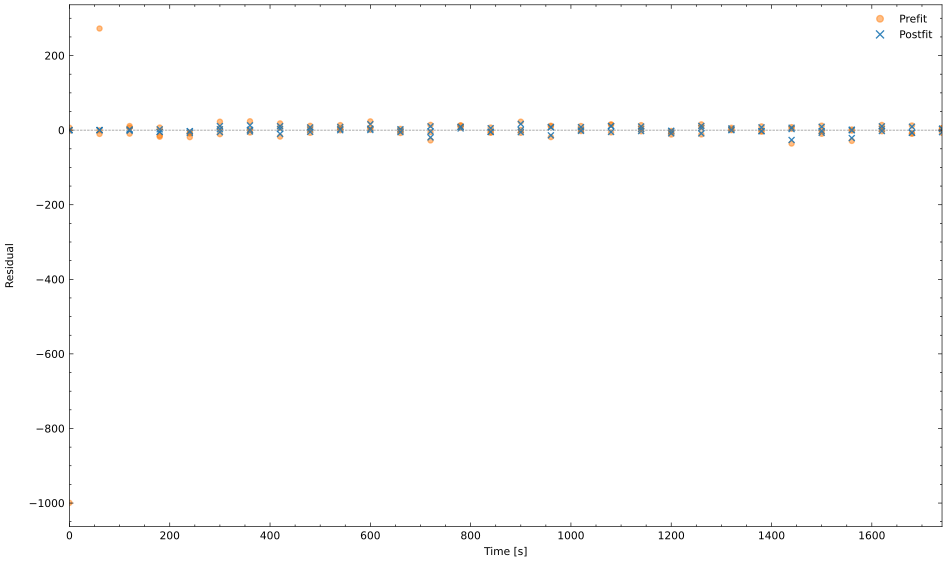
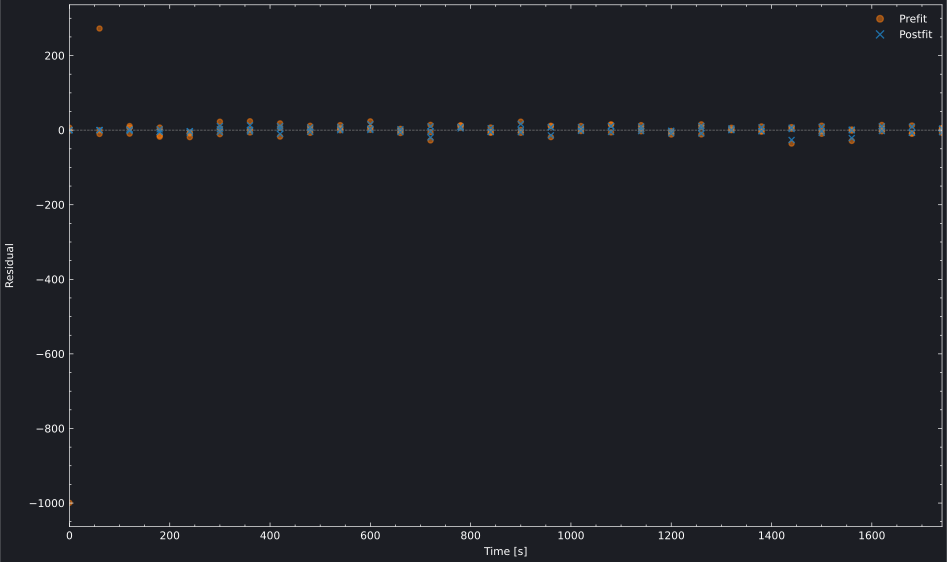
Residual plots show how well the estimated state explains the observations. Pre-fit residuals (\(\mathbf{z} - h(\hat{\mathbf{x}}^-)\)) reflect the prediction quality; post-fit residuals (\(\mathbf{z} - h(\hat{\mathbf{x}}^+)\)) show how much unexplained measurement error remains after the update. When residual_type="both", prefit and postfit are overlaid with distinct colors and marker styles for direct visual comparison. Sequential filters (EKF, UKF) show the clearest prefit/postfit separation since each observation has a distinct predict→update step.

Interactive Residual Plot (Plotly)

Plot Source
estimation_residuals_plotly.py
"""
EKF Measurement Residuals - Plotly Backend

Plots prefit and postfit measurement residuals overlaid, showing the
per-observation predict→update correction in the Extended Kalman Filter.
The truth uses a full force model while the filter uses simplified 5x5
gravity, creating dynamics model mismatch that separates the two.
"""

import os
import pathlib
import sys
import numpy as np
import brahe as bh

# Add plots directory to path for importing brahe_theme
sys.path.insert(0, str(pathlib.Path(__file__).parent.parent.parent))
from brahe_theme import save_themed_html

# Configuration
SCRIPT_NAME = pathlib.Path(__file__).stem
OUTDIR = pathlib.Path(os.getenv("BRAHE_FIGURE_OUTPUT_DIR", "./docs/figures/"))
os.makedirs(OUTDIR, exist_ok=True)

# Initialize EOP and space weather data
bh.initialize_eop()
bh.initialize_sw()

# Truth orbit: LEO 500 km, ISS-like inclination
epoch = bh.Epoch(2024, 1, 1, 0, 0, 0.0)
oe = np.array([bh.R_EARTH + 500e3, 0.01, np.radians(51.6), 0.0, 0.0, 0.0])
true_state = bh.state_koe_to_eci(oe, bh.AngleFormat.RADIANS)

# Truth propagator: full force model (20x20 gravity, drag, SRP, third-body)
# params: [mass_kg, drag_area_m2, Cd, srp_area_m2, Cr]
true_params = np.array([1000.0, 10.0, 2.2, 10.0, 1.3])
truth_prop = bh.NumericalOrbitPropagator(
    epoch,
    true_state,
    bh.NumericalPropagationConfig.default(),
    bh.ForceModelConfig.default(),
    params=true_params,
)

# Generate noisy inertial position observations
np.random.seed(42)
observations = []
for i in range(1, 31):
    t = epoch + i * 60.0
    truth_prop.propagate_to(t)
    truth_eci = truth_prop.current_state()
    noisy_pos = truth_eci[:3] + np.random.randn(3) * 10.0
    observations.append(bh.Observation(t, noisy_pos, model_index=0))

# EKF with perturbed initial state (+1 km in X) and simplified dynamics
# Uses 5x5 gravity only — model mismatch with truth creates prefit ≠ postfit
initial_state = true_state.copy()
initial_state[0] += 1000.0
p0 = np.diag([1e6, 1e6, 1e6, 1e2, 1e2, 1e2])

q = np.diag([1e-4, 1e-4, 1e-4, 1e-6, 1e-6, 1e-6])
ekf_config = bh.EKFConfig(process_noise=bh.ProcessNoiseConfig(q, scale_with_dt=True))

ekf = bh.ExtendedKalmanFilter(
    epoch,
    initial_state,
    p0,
    measurement_models=[bh.InertialPositionMeasurementModel(10.0)],
    propagation_config=bh.NumericalPropagationConfig.default(),
    force_config=bh.ForceModelConfig(
        gravity=bh.GravityConfiguration(degree=5, order=5)
    ),
    config=ekf_config,
)

for obs in observations:
    ekf.process_observation(obs)

# Plot residuals
fig = bh.plot_measurement_residual(
    solver=ekf,
    residual_type="both",
    labels=["X [m]", "Y [m]", "Z [m]"],
    backend="plotly",
)

# Save themed HTML files
light_path, dark_path = save_themed_html(fig, OUTDIR / SCRIPT_NAME)
print(f"✓ Generated {light_path}")
print(f"✓ Generated {dark_path}")

Static Residual Plot (Matplotlib)

Measurement Residuals Measurement Residuals
Plot Source
estimation_residuals_matplotlib.py
"""
EKF Measurement Residuals - Matplotlib Backend

Plots prefit and postfit measurement residuals overlaid, showing the
per-observation predict→update correction in the Extended Kalman Filter.
The truth uses a full force model while the filter uses simplified 5x5
gravity, creating dynamics model mismatch that separates the two.
"""

import os
import pathlib
import numpy as np
import brahe as bh
import matplotlib.pyplot as plt

# Configuration
SCRIPT_NAME = pathlib.Path(__file__).stem
OUTDIR = pathlib.Path(os.getenv("BRAHE_FIGURE_OUTPUT_DIR", "./docs/figures/"))
os.makedirs(OUTDIR, exist_ok=True)

# Initialize EOP and space weather data
bh.initialize_eop()
bh.initialize_sw()

# Truth orbit: LEO 500 km, ISS-like inclination
epoch = bh.Epoch(2024, 1, 1, 0, 0, 0.0)
oe = np.array([bh.R_EARTH + 500e3, 0.01, np.radians(51.6), 0.0, 0.0, 0.0])
true_state = bh.state_koe_to_eci(oe, bh.AngleFormat.RADIANS)

# Truth propagator: full force model (20x20 gravity, drag, SRP, third-body)
# params: [mass_kg, drag_area_m2, Cd, srp_area_m2, Cr]
true_params = np.array([1000.0, 10.0, 2.2, 10.0, 1.3])
truth_prop = bh.NumericalOrbitPropagator(
    epoch,
    true_state,
    bh.NumericalPropagationConfig.default(),
    bh.ForceModelConfig.default(),
    params=true_params,
)

# Generate noisy inertial position observations
np.random.seed(42)
observations = []
for i in range(1, 31):
    t = epoch + i * 60.0
    truth_prop.propagate_to(t)
    truth_eci = truth_prop.current_state()
    noisy_pos = truth_eci[:3] + np.random.randn(3) * 10.0
    observations.append(bh.Observation(t, noisy_pos, model_index=0))

# EKF with perturbed initial state (+1 km in X) and simplified dynamics
# Uses 5x5 gravity only — model mismatch with truth creates prefit ≠ postfit
initial_state = true_state.copy()
initial_state[0] += 1000.0
p0 = np.diag([1e6, 1e6, 1e6, 1e2, 1e2, 1e2])

q = np.diag([1e-4, 1e-4, 1e-4, 1e-6, 1e-6, 1e-6])
ekf_config = bh.EKFConfig(process_noise=bh.ProcessNoiseConfig(q, scale_with_dt=True))

ekf = bh.ExtendedKalmanFilter(
    epoch,
    initial_state,
    p0,
    measurement_models=[bh.InertialPositionMeasurementModel(10.0)],
    propagation_config=bh.NumericalPropagationConfig.default(),
    force_config=bh.ForceModelConfig(
        gravity=bh.GravityConfiguration(degree=5, order=5)
    ),
    config=ekf_config,
)

for obs in observations:
    ekf.process_observation(obs)

# Plot residuals — light mode
fig = bh.plot_measurement_residual(
    solver=ekf,
    residual_type="both",
    labels=["X [m]", "Y [m]", "Z [m]"],
    backend="matplotlib",
)

light_path = OUTDIR / f"{SCRIPT_NAME}_light.svg"
fig.savefig(light_path, dpi=300, bbox_inches="tight")
print(f"✓ Generated {light_path}")
plt.close(fig)

# Plot residuals — dark mode
fig = bh.plot_measurement_residual(
    solver=ekf,
    residual_type="both",
    labels=["X [m]", "Y [m]", "Z [m]"],
    backend="matplotlib",
    backend_config={"dark_mode": True},
)

dark_path = OUTDIR / f"{SCRIPT_NAME}_dark.svg"
fig.savefig(dark_path, dpi=300, bbox_inches="tight")
print(f"✓ Generated {dark_path}")
plt.close(fig)

RMS Residuals

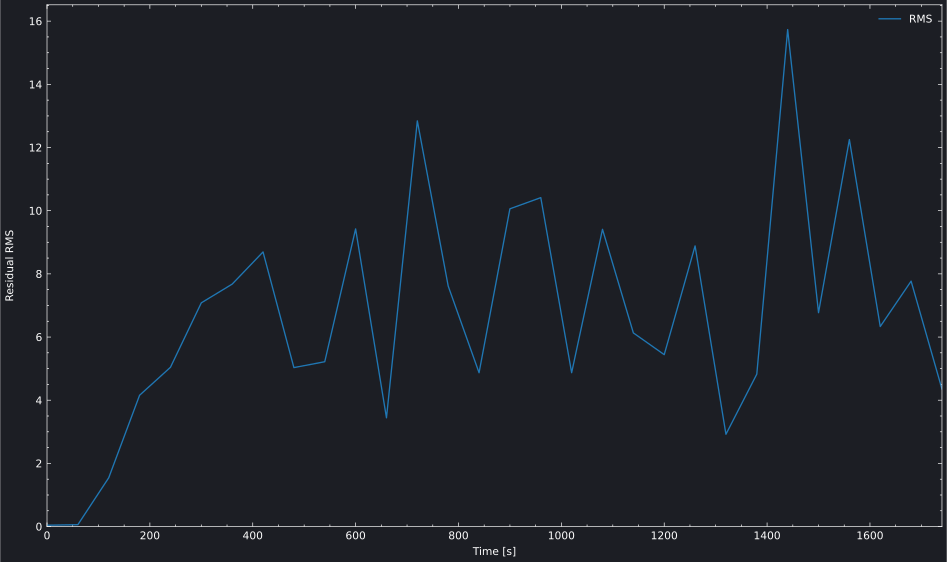
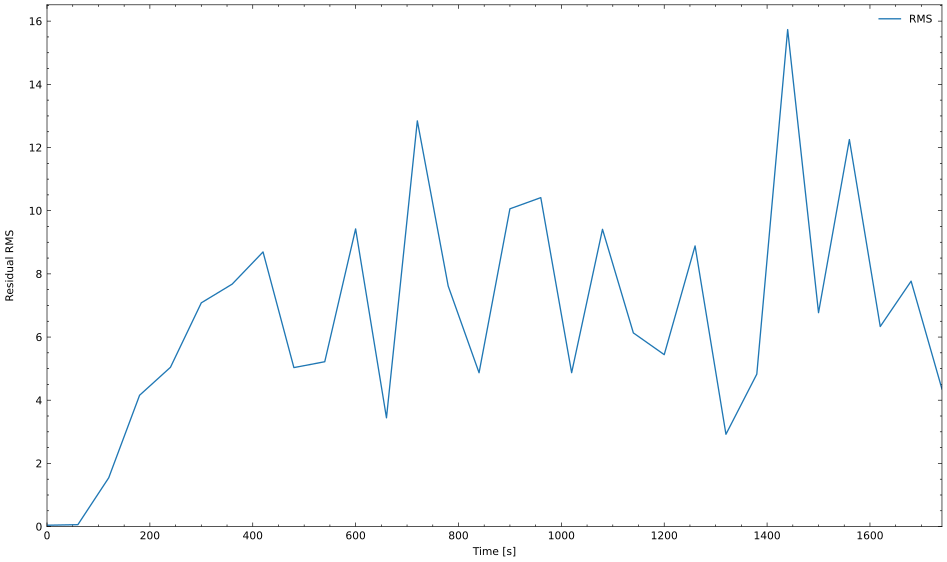
The RMS residual view compresses per-component residuals into a single scalar per epoch — the root mean square across all measurement components. This is useful for tracking overall measurement fit quality over time.

Plot Source
estimation_residual_rms_plotly.py
"""
EKF Residual RMS - Plotly Backend

Plots the root mean square of postfit residuals from an Extended Kalman Filter,
providing a scalar summary of fit quality over the observation window.
"""

import os
import pathlib
import sys
import numpy as np
import brahe as bh

# Add plots directory to path for importing brahe_theme
sys.path.insert(0, str(pathlib.Path(__file__).parent.parent.parent))
from brahe_theme import save_themed_html

# Configuration
SCRIPT_NAME = pathlib.Path(__file__).stem
OUTDIR = pathlib.Path(os.getenv("BRAHE_FIGURE_OUTPUT_DIR", "./docs/figures/"))
os.makedirs(OUTDIR, exist_ok=True)

# Initialize EOP and space weather data
bh.initialize_eop()
bh.initialize_sw()

# Truth orbit: LEO 500 km, ISS-like inclination
epoch = bh.Epoch(2024, 1, 1, 0, 0, 0.0)
oe = np.array([bh.R_EARTH + 500e3, 0.01, np.radians(51.6), 0.0, 0.0, 0.0])
true_state = bh.state_koe_to_eci(oe, bh.AngleFormat.RADIANS)

# Truth propagator: full force model (20x20 gravity, drag, SRP, third-body)
# params: [mass_kg, drag_area_m2, Cd, srp_area_m2, Cr]
true_params = np.array([1000.0, 10.0, 2.2, 10.0, 1.3])
truth_prop = bh.NumericalOrbitPropagator(
    epoch,
    true_state,
    bh.NumericalPropagationConfig.default(),
    bh.ForceModelConfig.default(),
    params=true_params,
)

# Generate noisy inertial position observations
np.random.seed(42)
observations = []
for i in range(1, 31):
    t = epoch + i * 60.0
    truth_prop.propagate_to(t)
    truth_eci = truth_prop.current_state()
    noisy_pos = truth_eci[:3] + np.random.randn(3) * 10.0
    observations.append(bh.Observation(t, noisy_pos, model_index=0))

# EKF with perturbed initial state (+1 km in X) and simplified dynamics
initial_state = true_state.copy()
initial_state[0] += 1000.0
p0 = np.diag([1e6, 1e6, 1e6, 1e2, 1e2, 1e2])

q = np.diag([1e-4, 1e-4, 1e-4, 1e-6, 1e-6, 1e-6])
ekf_config = bh.EKFConfig(process_noise=bh.ProcessNoiseConfig(q, scale_with_dt=True))

ekf = bh.ExtendedKalmanFilter(
    epoch,
    initial_state,
    p0,
    measurement_models=[bh.InertialPositionMeasurementModel(10.0)],
    propagation_config=bh.NumericalPropagationConfig.default(),
    force_config=bh.ForceModelConfig(
        gravity=bh.GravityConfiguration(degree=5, order=5)
    ),
    config=ekf_config,
)

for obs in observations:
    ekf.process_observation(obs)

# Plot residual RMS
fig = bh.plot_measurement_residual_rms(
    solver=ekf,
    residual_type="postfit",
    backend="plotly",
)

# Save themed HTML files
light_path, dark_path = save_themed_html(fig, OUTDIR / SCRIPT_NAME)
print(f"✓ Generated {light_path}")
print(f"✓ Generated {dark_path}")
Residual RMS Residual RMS
Plot Source
estimation_residual_rms_matplotlib.py
"""
EKF Residual RMS - Matplotlib Backend

Plots the root mean square of postfit residuals from an Extended Kalman Filter,
providing a scalar summary of fit quality over the observation window.
"""

import os
import pathlib
import numpy as np
import brahe as bh
import matplotlib.pyplot as plt

# Configuration
SCRIPT_NAME = pathlib.Path(__file__).stem
OUTDIR = pathlib.Path(os.getenv("BRAHE_FIGURE_OUTPUT_DIR", "./docs/figures/"))
os.makedirs(OUTDIR, exist_ok=True)

# Initialize EOP and space weather data
bh.initialize_eop()
bh.initialize_sw()

# Truth orbit: LEO 500 km, ISS-like inclination
epoch = bh.Epoch(2024, 1, 1, 0, 0, 0.0)
oe = np.array([bh.R_EARTH + 500e3, 0.01, np.radians(51.6), 0.0, 0.0, 0.0])
true_state = bh.state_koe_to_eci(oe, bh.AngleFormat.RADIANS)

# Truth propagator: full force model (20x20 gravity, drag, SRP, third-body)
# params: [mass_kg, drag_area_m2, Cd, srp_area_m2, Cr]
true_params = np.array([1000.0, 10.0, 2.2, 10.0, 1.3])
truth_prop = bh.NumericalOrbitPropagator(
    epoch,
    true_state,
    bh.NumericalPropagationConfig.default(),
    bh.ForceModelConfig.default(),
    params=true_params,
)

# Generate noisy inertial position observations
np.random.seed(42)
observations = []
for i in range(1, 31):
    t = epoch + i * 60.0
    truth_prop.propagate_to(t)
    truth_eci = truth_prop.current_state()
    noisy_pos = truth_eci[:3] + np.random.randn(3) * 10.0
    observations.append(bh.Observation(t, noisy_pos, model_index=0))

# EKF with perturbed initial state (+1 km in X) and simplified dynamics
initial_state = true_state.copy()
initial_state[0] += 1000.0
p0 = np.diag([1e6, 1e6, 1e6, 1e2, 1e2, 1e2])

q = np.diag([1e-4, 1e-4, 1e-4, 1e-6, 1e-6, 1e-6])
ekf_config = bh.EKFConfig(process_noise=bh.ProcessNoiseConfig(q, scale_with_dt=True))

ekf = bh.ExtendedKalmanFilter(
    epoch,
    initial_state,
    p0,
    measurement_models=[bh.InertialPositionMeasurementModel(10.0)],
    propagation_config=bh.NumericalPropagationConfig.default(),
    force_config=bh.ForceModelConfig(
        gravity=bh.GravityConfiguration(degree=5, order=5)
    ),
    config=ekf_config,
)

for obs in observations:
    ekf.process_observation(obs)

# Plot residual RMS — light mode
fig = bh.plot_measurement_residual_rms(
    solver=ekf,
    residual_type="postfit",
    backend="matplotlib",
)

light_path = OUTDIR / f"{SCRIPT_NAME}_light.svg"
fig.savefig(light_path, dpi=300, bbox_inches="tight")
print(f"✓ Generated {light_path}")
plt.close(fig)

# Plot residual RMS — dark mode
fig = bh.plot_measurement_residual_rms(
    solver=ekf,
    residual_type="postfit",
    backend="matplotlib",
    backend_config={"dark_mode": True},
)

dark_path = OUTDIR / f"{SCRIPT_NAME}_dark.svg"
fig.savefig(dark_path, dpi=300, bbox_inches="tight")
print(f"✓ Generated {dark_path}")
plt.close(fig)

Marginal Distributions

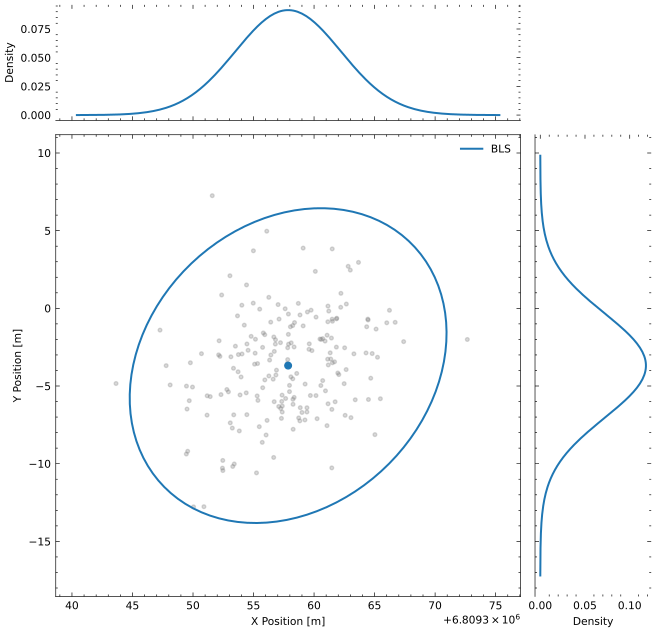
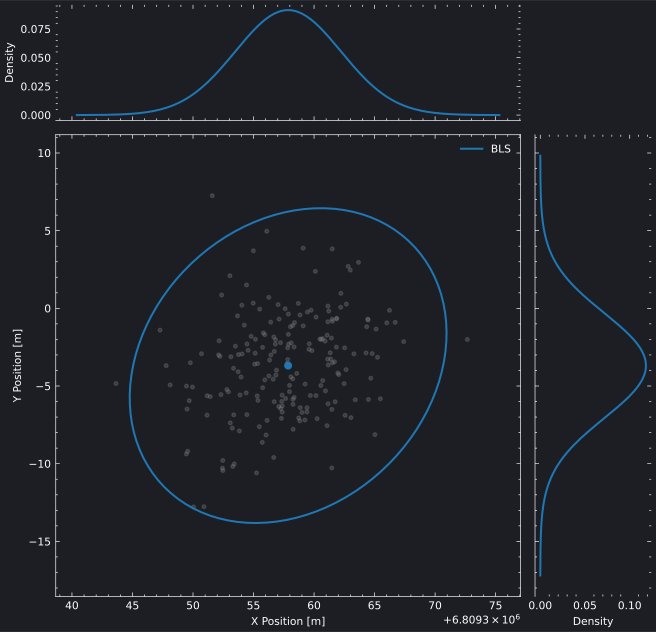
The marginal distribution plot shows the joint uncertainty between two state components as a covariance ellipse, with optional marginal density curves on the top and right axes. This visualization is useful for understanding correlation structure and comparing uncertainty representations from different estimation methods. The scatter_points parameter overlays Monte Carlo samples for visual comparison against the analytical covariance ellipse.

Interactive Marginal Plot (Plotly)

Plot Source
estimation_marginal_plotly.py
"""
BLS Marginal Distribution - Plotly Backend

Plots the 2D covariance ellipse for the X-Y position estimate with Monte Carlo
scatter overlay, showing the marginal distribution from a Batch Least Squares solution.
"""

import os
import pathlib
import sys
import numpy as np
import brahe as bh

# Add plots directory to path for importing brahe_theme
sys.path.insert(0, str(pathlib.Path(__file__).parent.parent.parent))
from brahe_theme import save_themed_html

# Configuration
SCRIPT_NAME = pathlib.Path(__file__).stem
OUTDIR = pathlib.Path(os.getenv("BRAHE_FIGURE_OUTPUT_DIR", "./docs/figures/"))
os.makedirs(OUTDIR, exist_ok=True)

# Initialize EOP data
bh.initialize_eop()

# Truth orbit: LEO 500 km, ISS-like inclination
epoch = bh.Epoch(2024, 1, 1, 0, 0, 0.0)
oe = np.array([bh.R_EARTH + 500e3, 0.01, np.radians(51.6), 0.0, 0.0, 0.0])
true_state = bh.state_koe_to_eci(oe, bh.AngleFormat.RADIANS)

# Truth propagator
truth_prop = bh.NumericalOrbitPropagator(
    epoch,
    true_state,
    bh.NumericalPropagationConfig.default(),
    bh.ForceModelConfig.two_body(),
)

# Generate noisy ECI position observations
np.random.seed(42)
observations = []
for i in range(1, 31):
    t = epoch + i * 60.0
    truth_prop.propagate_to(t)
    truth_eci = truth_prop.current_state()
    noisy_pos = truth_eci[:3] + np.random.randn(3) * 10.0
    observations.append(bh.Observation(t, noisy_pos, model_index=0))

# BLS with perturbed initial state (+1 km in X)
initial_state = true_state.copy()
initial_state[0] += 1000.0
p0 = np.diag([1e6, 1e6, 1e6, 1e2, 1e2, 1e2])

bls = bh.BatchLeastSquares(
    epoch,
    initial_state,
    p0,
    propagation_config=bh.NumericalPropagationConfig.default(),
    force_config=bh.ForceModelConfig.two_body(),
    measurement_models=[bh.InertialPositionMeasurementModel(10.0)],
)
bls.solve(observations)

# Generate Monte Carlo samples from the final X-Y position covariance
final_state = bls.current_state()
final_cov = bls.current_covariance()
mc_samples = np.random.multivariate_normal(final_state[:2], final_cov[:2, :2], 200)

# Plot marginal
fig = bh.plot_estimator_marginal(
    solvers=[bls],
    state_indices=(0, 1),
    sigma=3,
    state_labels=("X Position [m]", "Y Position [m]"),
    scatter_points=mc_samples,
    labels=["BLS"],
    backend="plotly",
)

# Save themed HTML files
light_path, dark_path = save_themed_html(fig, OUTDIR / SCRIPT_NAME)
print(f"✓ Generated {light_path}")
print(f"✓ Generated {dark_path}")

Static Marginal Plot (Matplotlib)

Marginal Distribution Marginal Distribution
Plot Source
estimation_marginal_matplotlib.py
"""
BLS Marginal Distribution - Matplotlib Backend

Plots the 2D covariance ellipse for the X-Y position estimate with Monte Carlo
scatter overlay, showing the marginal distribution from a Batch Least Squares solution.
"""

import os
import pathlib
import numpy as np
import brahe as bh
import matplotlib.pyplot as plt

# Configuration
SCRIPT_NAME = pathlib.Path(__file__).stem
OUTDIR = pathlib.Path(os.getenv("BRAHE_FIGURE_OUTPUT_DIR", "./docs/figures/"))
os.makedirs(OUTDIR, exist_ok=True)

# Initialize EOP data
bh.initialize_eop()

# Truth orbit: LEO 500 km, ISS-like inclination
epoch = bh.Epoch(2024, 1, 1, 0, 0, 0.0)
oe = np.array([bh.R_EARTH + 500e3, 0.01, np.radians(51.6), 0.0, 0.0, 0.0])
true_state = bh.state_koe_to_eci(oe, bh.AngleFormat.RADIANS)

# Truth propagator
truth_prop = bh.NumericalOrbitPropagator(
    epoch,
    true_state,
    bh.NumericalPropagationConfig.default(),
    bh.ForceModelConfig.two_body(),
)

# Generate noisy ECI position observations
np.random.seed(42)
observations = []
for i in range(1, 31):
    t = epoch + i * 60.0
    truth_prop.propagate_to(t)
    truth_eci = truth_prop.current_state()
    noisy_pos = truth_eci[:3] + np.random.randn(3) * 10.0
    observations.append(bh.Observation(t, noisy_pos, model_index=0))

# BLS with perturbed initial state (+1 km in X)
initial_state = true_state.copy()
initial_state[0] += 1000.0
p0 = np.diag([1e6, 1e6, 1e6, 1e2, 1e2, 1e2])

bls = bh.BatchLeastSquares(
    epoch,
    initial_state,
    p0,
    propagation_config=bh.NumericalPropagationConfig.default(),
    force_config=bh.ForceModelConfig.two_body(),
    measurement_models=[bh.InertialPositionMeasurementModel(10.0)],
)
bls.solve(observations)

# Generate Monte Carlo samples from the final X-Y position covariance
final_state = bls.current_state()
final_cov = bls.current_covariance()
mc_samples = np.random.multivariate_normal(final_state[:2], final_cov[:2, :2], 200)

# Plot marginal — light mode
fig = bh.plot_estimator_marginal(
    solvers=[bls],
    state_indices=(0, 1),
    sigma=3,
    state_labels=("X Position [m]", "Y Position [m]"),
    scatter_points=mc_samples,
    labels=["BLS"],
    backend="matplotlib",
)

light_path = OUTDIR / f"{SCRIPT_NAME}_light.svg"
fig.savefig(light_path, dpi=300, bbox_inches="tight")
print(f"✓ Generated {light_path}")
plt.close(fig)

# Plot marginal — dark mode
fig = bh.plot_estimator_marginal(
    solvers=[bls],
    state_indices=(0, 1),
    sigma=3,
    state_labels=("X Position [m]", "Y Position [m]"),
    scatter_points=mc_samples,
    labels=["BLS"],
    backend="matplotlib",
    backend_config={"dark_mode": True},
)

dark_path = OUTDIR / f"{SCRIPT_NAME}_dark.svg"
fig.savefig(dark_path, dpi=300, bbox_inches="tight")
print(f"✓ Generated {dark_path}")
plt.close(fig)

The state_indices parameter selects which pair of state components to visualize — for example, (0, 1) for X-Y position or (3, 4) for Vx-Vy velocity.


See Also