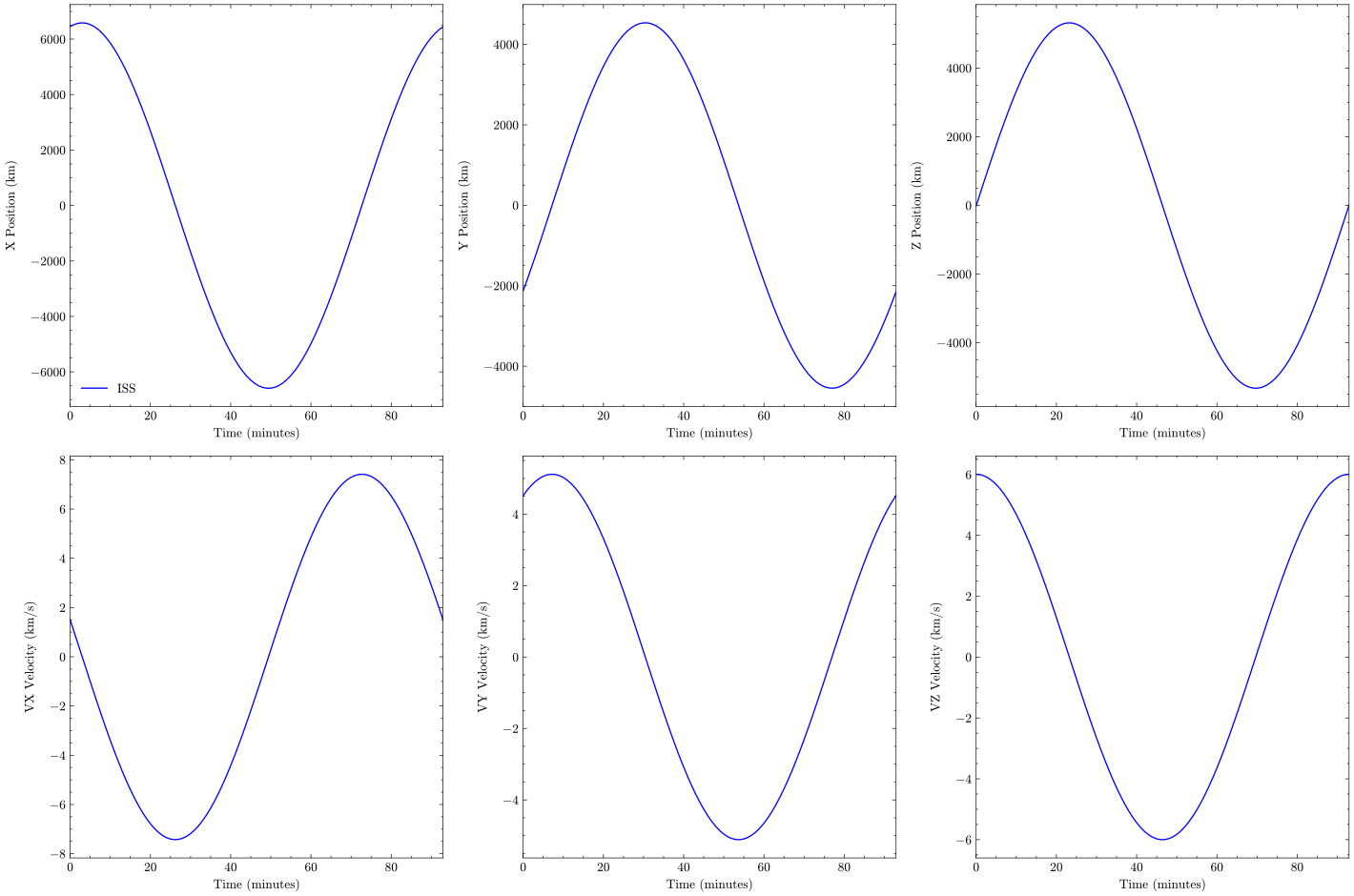
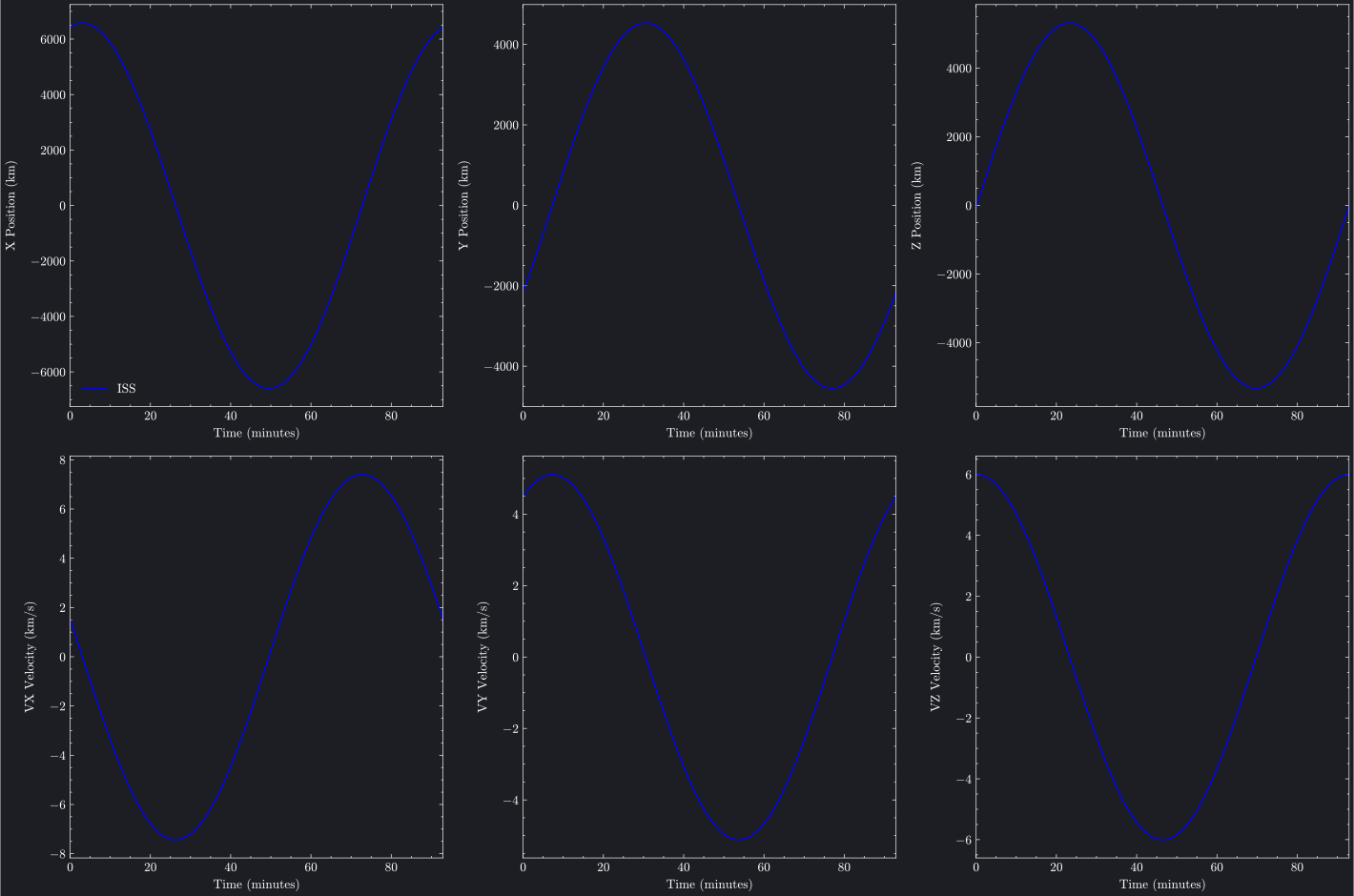
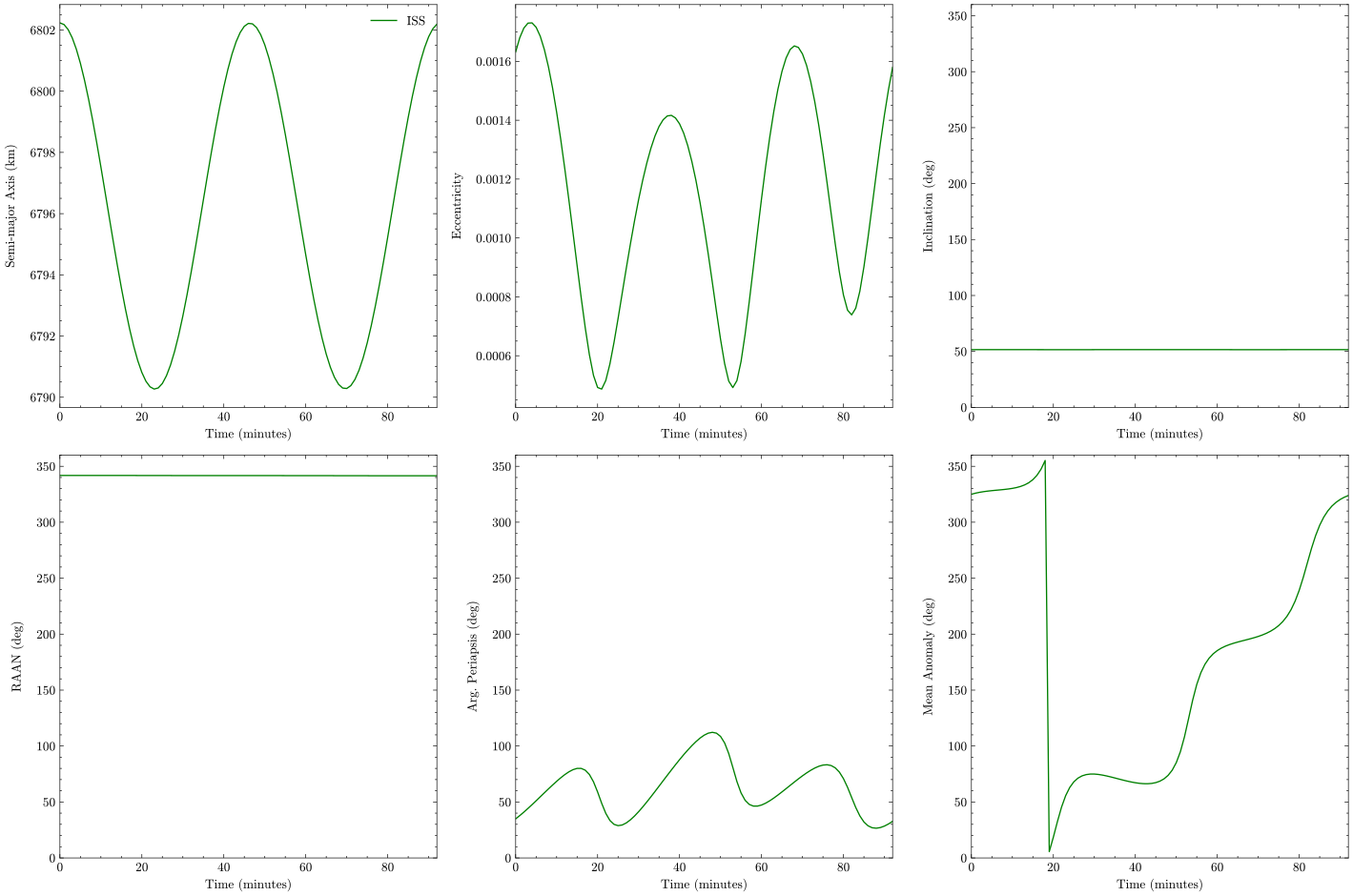
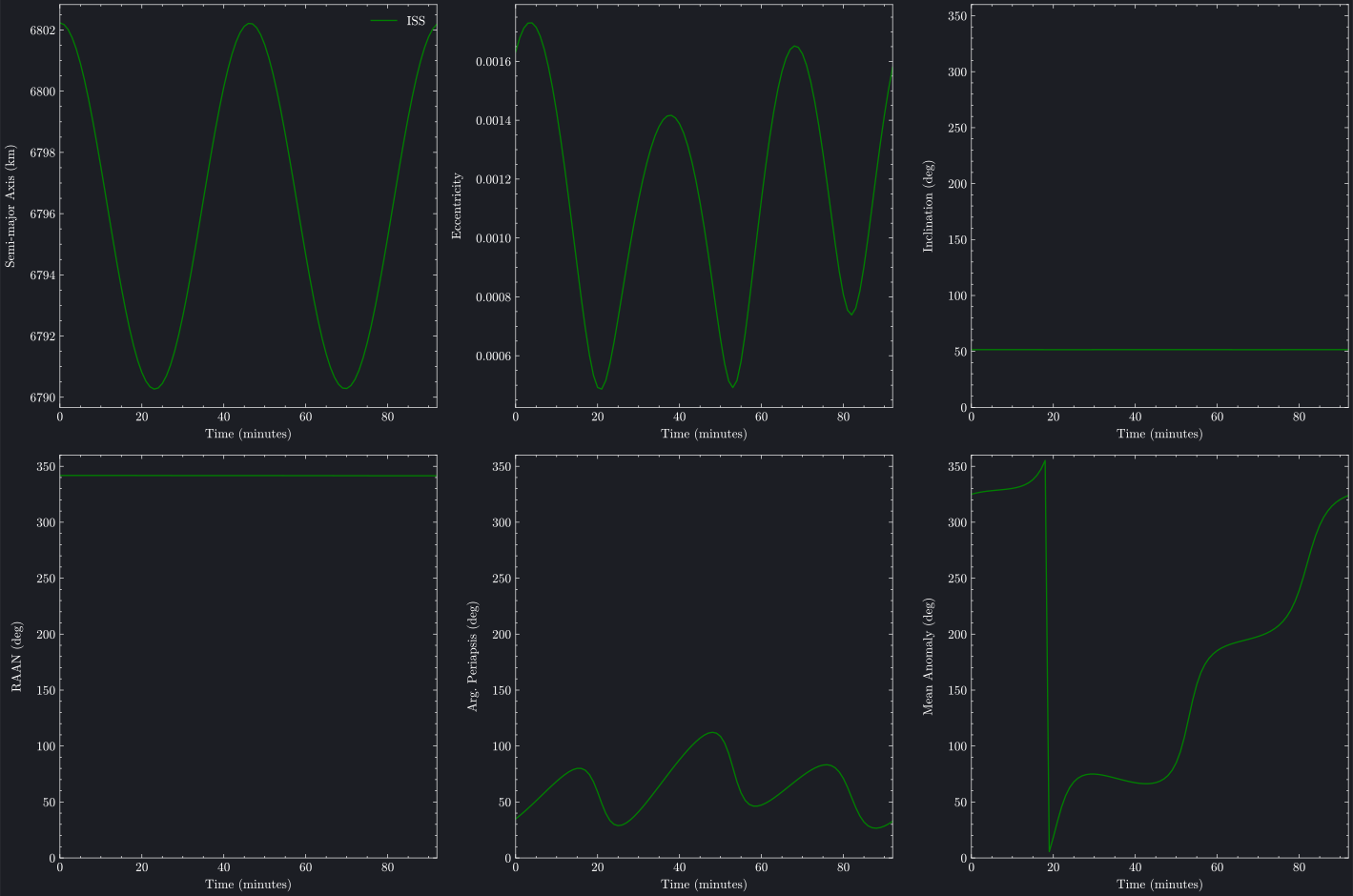
Orbital element trajectory plots track how position, velocity, and orbital parameters evolve over time. Brahe provides two complementary views: Cartesian plots showing state vectors (x, y, z, vx, vy, vz) and Keplerian plots showing classical elements (a, e, i, Ω, ω, ν). These visualizations are essential for analyzing perturbations, verifying propagators, and understanding orbital dynamics.
"""Cartesian Trajectory Plot Example - Plotly BackendThis script demonstrates how to plot Cartesian state elements (x, y, z, vx, vy, vz) vs timeusing the plotly backend for interactive visualization."""importosimportpathlibimportsysimportbraheasbh# Add plots directory to path for importing brahe_themesys.path.insert(0,str(pathlib.Path(__file__).parent.parent.parent))frombrahe_themeimportsave_themed_html# ConfigurationSCRIPT_NAME=pathlib.Path(__file__).stemOUTDIR=pathlib.Path(os.getenv("BRAHE_FIGURE_OUTPUT_DIR","./docs/figures/"))os.makedirs(OUTDIR,exist_ok=True)# Initialize EOP databh.initialize_eop()# ISS TLE for November 3, 2025tle_line0="ISS (ZARYA)"tle_line1="1 25544U 98067A 25306.42331346 .00010070 00000-0 18610-3 0 9999"tle_line2="2 25544 51.6344 342.0717 0004969 8.9436 351.1640 15.49700017536601"# Create SGP4 propagatorprop=bh.SGPPropagator.from_3le(tle_line0,tle_line1,tle_line2,60.0)# Define time range for one orbital periodepoch=prop.epochduration=bh.orbital_period(prop.semi_major_axis)print(f"Propagating from {epoch} for {duration} seconds.")# Generate trajectory by propagatingprop.propagate_to(epoch+duration)traj=prop.trajectory# Create Cartesian trajectory plotfig=bh.plot_cartesian_trajectory([{"trajectory":traj,"color":"blue","label":"ISS"}],position_units="km",velocity_units="km/s",backend="plotly",)# Save themed HTML fileslight_path,dark_path=save_themed_html(fig,OUTDIR/SCRIPT_NAME)print(f"✓ Generated {light_path}")print(f"✓ Generated {dark_path}")
"""Cartesian Trajectory Plot Example - Matplotlib BackendThis script demonstrates how to plot Cartesian state elements (x, y, z, vx, vy, vz) vs timeusing the matplotlib backend."""importbraheasbh# Initialize EOP databh.initialize_eop()# ISS TLE for November 3, 2025tle_line0="ISS (ZARYA)"tle_line1="1 25544U 98067A 25306.42331346 .00010070 00000-0 18610-3 0 9999"tle_line2="2 25544 51.6344 342.0717 0004969 8.9436 351.1640 15.49700017536601"# Create SGP4 propagatorprop=bh.SGPPropagator.from_3le(tle_line0,tle_line1,tle_line2,60.0)# Define time range for one orbital period (~92 minutes for ISS)epoch=prop.epochduration=bh.orbital_period(prop.semi_major_axis)print(f"Propagating from {epoch} for {duration} seconds.")# Generate trajectory by propagatingprop.propagate_to(epoch+duration)traj=prop.trajectory# Create Cartesian trajectory plot in light modefig=bh.plot_cartesian_trajectory([{"trajectory":traj,"color":"blue","label":"ISS"}],position_units="km",velocity_units="km/s",backend="matplotlib",matplotlib_config={"dark_mode":False},)# Save light mode figurefig.savefig("docs/figures/plot_cartesian_trajectory_matplotlib_light.svg",dpi=300,bbox_inches="tight",)print("Cartesian trajectory plot (matplotlib, light mode) saved to: docs/figures/plot_cartesian_trajectory_matplotlib_light.svg")# Create Cartesian trajectory plot in dark modefig=bh.plot_cartesian_trajectory([{"trajectory":traj,"color":"blue","label":"ISS"}],position_units="km",velocity_units="km/s",backend="matplotlib",matplotlib_config={"dark_mode":True},)# Set background color to match Plotly dark themefig.patch.set_facecolor("#1c1e24")foraxinfig.get_axes():ax.set_facecolor("#1c1e24")# Save dark mode figurefig.savefig("docs/figures/plot_cartesian_trajectory_matplotlib_dark.svg",dpi=300,bbox_inches="tight",)print("Cartesian trajectory plot (matplotlib, dark mode) saved to: docs/figures/plot_cartesian_trajectory_matplotlib_dark.svg")
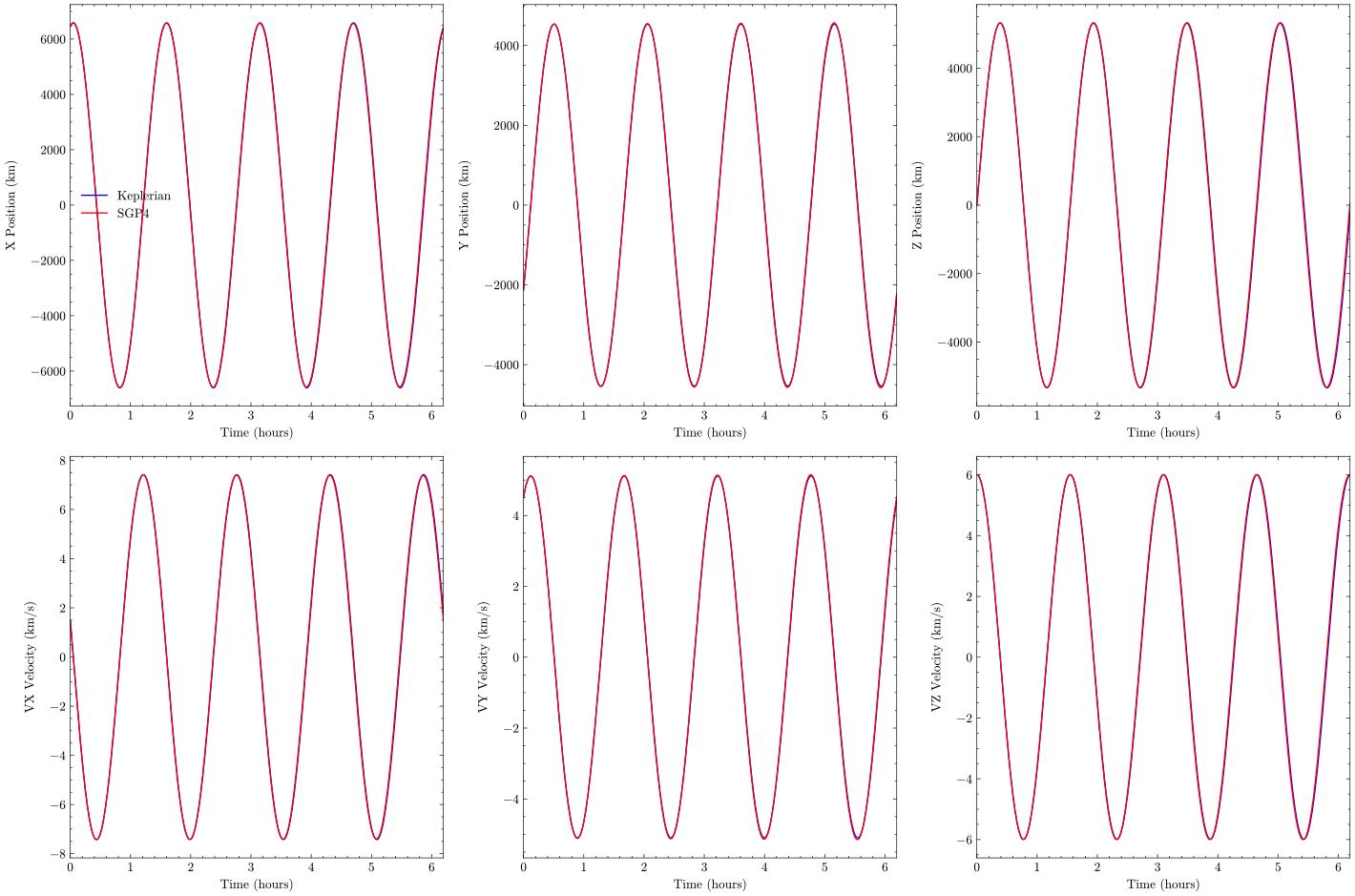
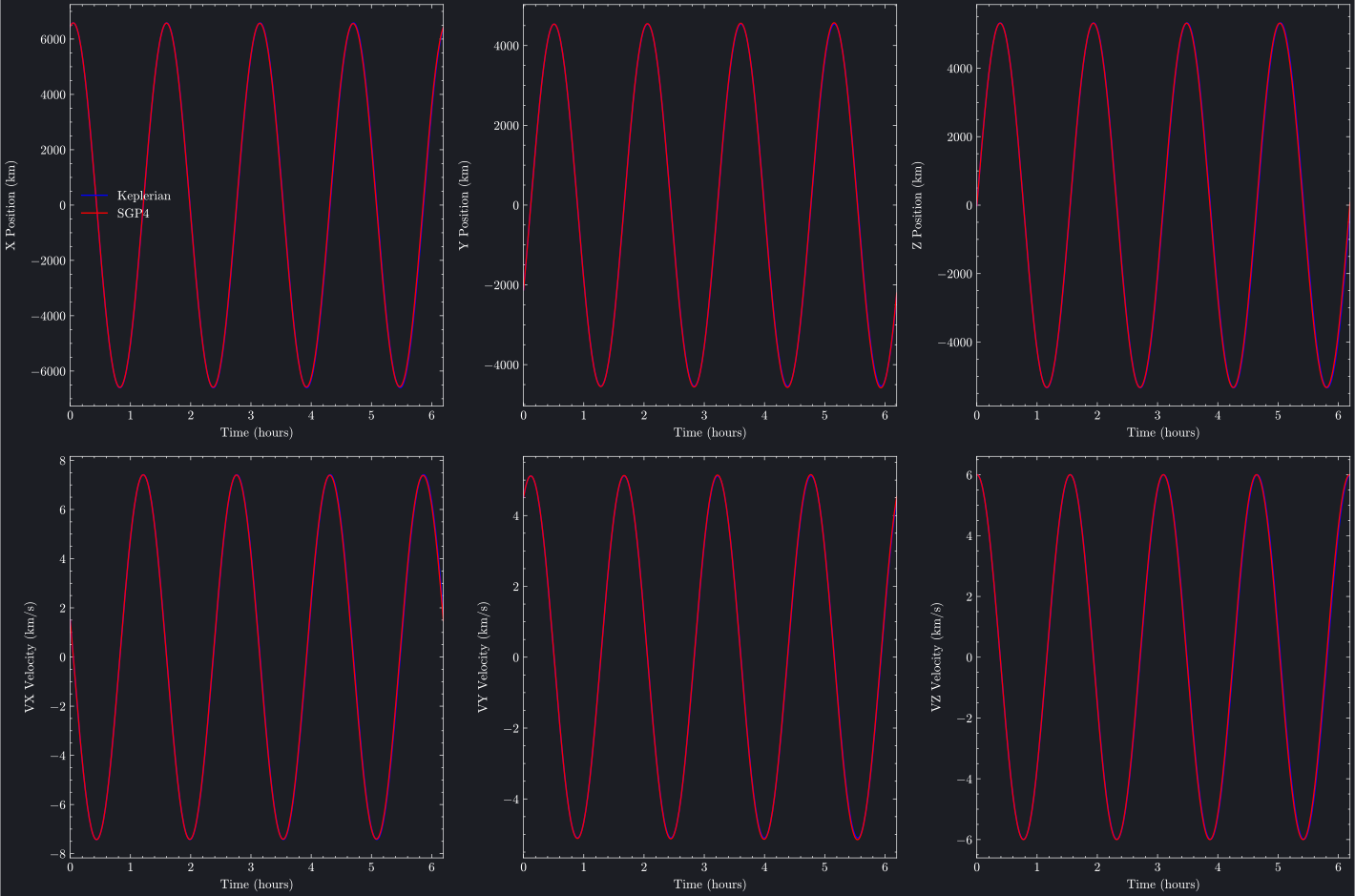
The 2×3 subplot layout shows:
Top row: x, y, z position components (km)
Bottom row: vx, vy, vz velocity components (km/s)
For circular orbits, you'll see sinusoidal patterns. Elliptical orbits show variations in velocity magnitude.
"""Keplerian Trajectory Plot Example - Plotly BackendThis script demonstrates how to plot Keplerian orbital elements (a, e, i, Ω, ω, ν) vs timeusing the plotly backend for interactive visualization."""importosimportpathlibimportsysimportbraheasbh# Add plots directory to path for importing brahe_themesys.path.insert(0,str(pathlib.Path(__file__).parent.parent.parent))frombrahe_themeimportsave_themed_html# ConfigurationSCRIPT_NAME=pathlib.Path(__file__).stemOUTDIR=pathlib.Path(os.getenv("BRAHE_FIGURE_OUTPUT_DIR","./docs/figures/"))os.makedirs(OUTDIR,exist_ok=True)# Initialize EOP databh.initialize_eop()# ISS TLE for November 3, 2025tle_line0="ISS (ZARYA)"tle_line1="1 25544U 98067A 25306.42331346 .00010070 00000-0 18610-3 0 9999"tle_line2="2 25544 51.6344 342.0717 0004969 8.9436 351.1640 15.49700017536601"# Create SGP4 propagatorprop=bh.SGPPropagator.from_3le(tle_line0,tle_line1,tle_line2,60.0)# Define time range for one orbital period (~92 minutes for ISS)epoch=prop.epochduration=92.0*60.0# seconds# Generate trajectory by propagatingprop.propagate_to(epoch+duration)traj=prop.trajectory# Create Keplerian trajectory plotfig=bh.plot_keplerian_trajectory([{"trajectory":traj,"color":"green","label":"ISS"}],sma_units="km",angle_units="deg",backend="plotly",plotly_config={"set_angle_ylim":True},)# Save themed HTML fileslight_path,dark_path=save_themed_html(fig,OUTDIR/SCRIPT_NAME)print(f"✓ Generated {light_path}")print(f"✓ Generated {dark_path}")
"""Keplerian Trajectory Plot Example - Matplotlib BackendThis script demonstrates how to plot Keplerian orbital elements (a, e, i, Ω, ω, ν) vs timeusing the matplotlib backend."""importbraheasbh# Initialize EOP databh.initialize_eop()# ISS TLE for November 3, 2025tle_line0="ISS (ZARYA)"tle_line1="1 25544U 98067A 25306.42331346 .00010070 00000-0 18610-3 0 9999"tle_line2="2 25544 51.6344 342.0717 0004969 8.9436 351.1640 15.49700017536601"# Create SGP4 propagatorprop=bh.SGPPropagator.from_3le(tle_line0,tle_line1,tle_line2,60.0)# Define time range for one orbital period (~92 minutes for ISS)epoch=prop.epochduration=92.0*60.0# seconds# Generate trajectory by propagatingprop.propagate_to(epoch+duration)traj=prop.trajectory# Create Keplerian trajectory plot in light modefig=bh.plot_keplerian_trajectory([{"trajectory":traj,"color":"green","label":"ISS"}],sma_units="km",angle_units="deg",backend="matplotlib",matplotlib_config={"dark_mode":False,"set_angle_ylim":True},)# Save light mode figurefig.savefig("docs/figures/plot_keplerian_trajectory_matplotlib_light.svg",dpi=300,bbox_inches="tight",)print("Keplerian trajectory plot (matplotlib, light mode) saved to: docs/figures/plot_keplerian_trajectory_matplotlib_light.svg")# Create Keplerian trajectory plot in dark modefig=bh.plot_keplerian_trajectory([{"trajectory":traj,"color":"green","label":"ISS"}],sma_units="km",angle_units="deg",backend="matplotlib",matplotlib_config={"dark_mode":True,"set_angle_ylim":True},)# Set background color to match Plotly dark themefig.patch.set_facecolor("#1c1e24")foraxinfig.get_axes():ax.set_facecolor("#1c1e24")# Save dark mode figurefig.savefig("docs/figures/plot_keplerian_trajectory_matplotlib_dark.svg",dpi=300,bbox_inches="tight",)print("Keplerian trajectory plot (matplotlib, dark mode) saved to: docs/figures/plot_keplerian_trajectory_matplotlib_dark.svg")
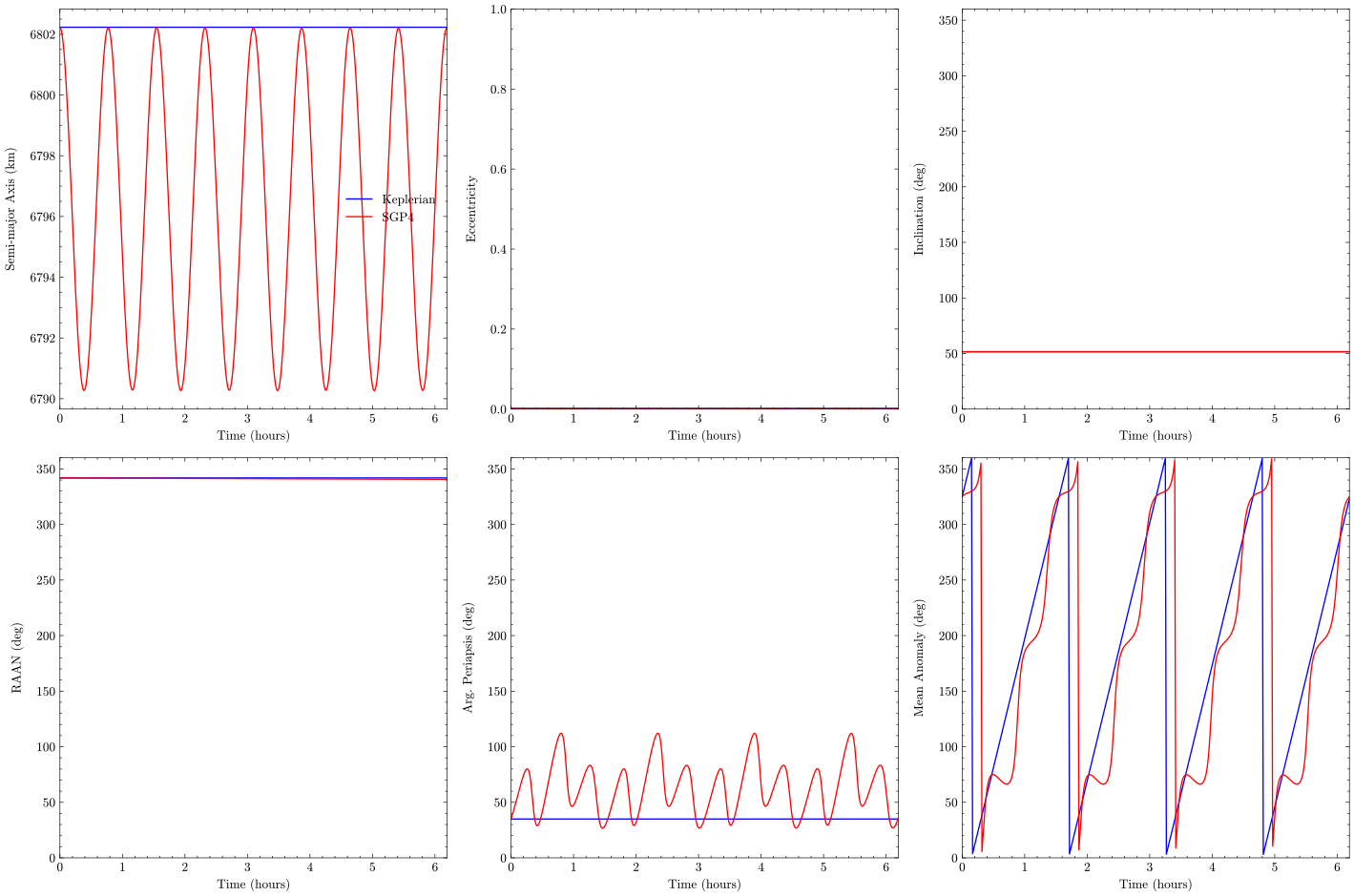
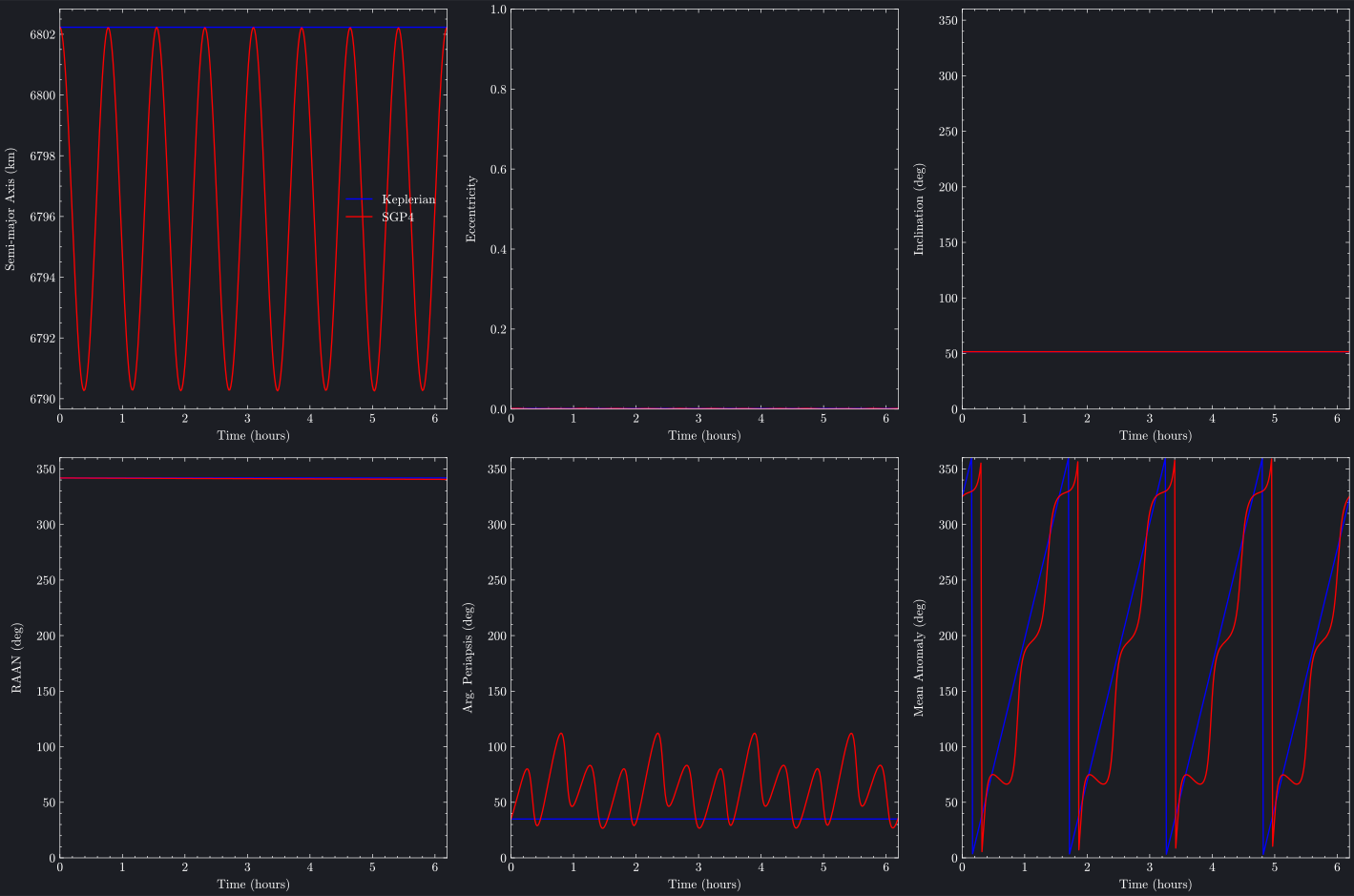
Compare different propagators to verify agreement or identify perturbation effects. These examples show how Keplerian (two-body) and SGP4 propagators diverge over time due to atmospheric drag and other perturbations.
The plots show how the two propagation methods diverge:
Keplerian (blue): Assumes pure two-body dynamics with no perturbations
SGP4 (red): Includes atmospheric drag and other perturbations
For near-circular LEO orbits, we notice there is significant variation in the argument of perigee (ω) and mean anomaly (M) over time due to numerical instability and ill-conditioning of these elements for near-circular orbits.
"""Comparing Propagators (Cartesian) Example - Plotly BackendThis script demonstrates how to compare different propagators (Keplerian vs SGP4)by plotting their Cartesian state trajectories side-by-side using the plotly backend for interactive visualization."""importosimportpathlibimportsysimportbraheasbh# Add plots directory to path for importing brahe_themesys.path.insert(0,str(pathlib.Path(__file__).parent.parent.parent))frombrahe_themeimportsave_themed_html# ConfigurationSCRIPT_NAME=pathlib.Path(__file__).stemOUTDIR=pathlib.Path(os.getenv("BRAHE_FIGURE_OUTPUT_DIR","./docs/figures/"))os.makedirs(OUTDIR,exist_ok=True)# Initialize EOP databh.initialize_eop()# ISS TLE for November 3, 2025tle_line0="ISS (ZARYA)"tle_line1="1 25544U 98067A 25306.42331346 .00010070 00000-0 18610-3 0 9999"tle_line2="2 25544 51.6344 342.0717 0004969 8.9436 351.1640 15.49700017536601"# Create SGP4 propagatorprop_sgp=bh.SGPPropagator.from_3le(tle_line0,tle_line1,tle_line2,60.0)epoch=prop_sgp.epoch# Get initial Cartesian state from SGP4 propagator for Keplerian propagatorinitial_state=prop_sgp.state_eci(epoch)# Create Keplerian propagator with same initial stateprop_kep=bh.KeplerianPropagator.from_eci(epoch,initial_state,60.0)# Propagate both for 4 orbital periods to see differencesduration=4*bh.orbital_period(prop_sgp.semi_major_axis)print(f"Propagating from {epoch} for {duration:.0f} seconds ({duration/3600:.1f} hours).")# Propagate both propagatorsprop_kep.propagate_to(epoch+duration)prop_sgp.propagate_to(epoch+duration)# Get trajectoriestraj_kep=prop_kep.trajectorytraj_sgp=prop_sgp.trajectory# Create comparison plotfig=bh.plot_cartesian_trajectory([{"trajectory":traj_kep,"color":"blue","label":"Keplerian"},{"trajectory":traj_sgp,"color":"red","label":"SGP4"},],position_units="km",velocity_units="km/s",backend="plotly",)# Save themed HTML fileslight_path,dark_path=save_themed_html(fig,OUTDIR/SCRIPT_NAME)print(f"✓ Generated {light_path}")print(f"✓ Generated {dark_path}")
"""Comparing Propagators (Cartesian) Example - Matplotlib BackendThis script demonstrates how to compare different propagators (Keplerian vs SGP4)by plotting their Cartesian state trajectories side-by-side using the matplotlib backend."""importbraheasbh# Initialize EOP databh.initialize_eop()# ISS TLE for November 3, 2025tle_line0="ISS (ZARYA)"tle_line1="1 25544U 98067A 25306.42331346 .00010070 00000-0 18610-3 0 9999"tle_line2="2 25544 51.6344 342.0717 0004969 8.9436 351.1640 15.49700017536601"# Create SGP4 propagatorprop_sgp=bh.SGPPropagator.from_3le(tle_line0,tle_line1,tle_line2,60.0)epoch=prop_sgp.epoch# Get initial Cartesian state from SGP4 propagator for Keplerian propagatorinitial_state=prop_sgp.state_eci(epoch)# Create Keplerian propagator with same initial stateprop_kep=bh.KeplerianPropagator.from_eci(epoch,initial_state,60.0)# Propagate both for 4 orbital periods to see differencesduration=4*bh.orbital_period(prop_sgp.semi_major_axis)print(f"Propagating from {epoch} for {duration:.0f} seconds ({duration/3600:.1f} hours).")# Propagate both propagatorsprop_kep.propagate_to(epoch+duration)prop_sgp.propagate_to(epoch+duration)# Get trajectoriestraj_kep=prop_kep.trajectorytraj_sgp=prop_sgp.trajectoryprint(f"Keplerian trajectory: {len(traj_kep)} states")print(f"SGP4 trajectory: {len(traj_sgp)} states")# Create comparison plot in light modefig=bh.plot_cartesian_trajectory([{"trajectory":traj_kep,"color":"blue","label":"Keplerian"},{"trajectory":traj_sgp,"color":"red","label":"SGP4"},],position_units="km",velocity_units="km/s",backend="matplotlib",matplotlib_config={"dark_mode":False},)# Save light mode figurefig.savefig("docs/figures/comparing_propagators_cartesian_matplotlib_light.svg",dpi=300,bbox_inches="tight",)print("Comparing propagators (Cartesian) plot (matplotlib, light mode) saved to: docs/figures/comparing_propagators_cartesian_matplotlib_light.svg")# Create comparison plot in dark modefig=bh.plot_cartesian_trajectory([{"trajectory":traj_kep,"color":"blue","label":"Keplerian"},{"trajectory":traj_sgp,"color":"red","label":"SGP4"},],position_units="km",velocity_units="km/s",backend="matplotlib",matplotlib_config={"dark_mode":True},)# Set background color to match Plotly dark themefig.patch.set_facecolor("#1c1e24")foraxinfig.get_axes():ax.set_facecolor("#1c1e24")# Save dark mode figurefig.savefig("docs/figures/comparing_propagators_cartesian_matplotlib_dark.svg",dpi=300,bbox_inches="tight",)print("Comparing propagators (Cartesian) plot (matplotlib, dark mode) saved to: docs/figures/comparing_propagators_cartesian_matplotlib_dark.svg")
"""Comparing Propagators (Keplerian) Example - Plotly BackendThis script demonstrates how to compare different propagators (Keplerian vs SGP4)by plotting their Keplerian element trajectories side-by-side using the plotly backend for interactive visualization."""importosimportpathlibimportsysimportbraheasbh# Add plots directory to path for importing brahe_themesys.path.insert(0,str(pathlib.Path(__file__).parent.parent.parent))frombrahe_themeimportsave_themed_html# ConfigurationSCRIPT_NAME=pathlib.Path(__file__).stemOUTDIR=pathlib.Path(os.getenv("BRAHE_FIGURE_OUTPUT_DIR","./docs/figures/"))os.makedirs(OUTDIR,exist_ok=True)# Initialize EOP databh.initialize_eop()# ISS TLE for November 3, 2025tle_line0="ISS (ZARYA)"tle_line1="1 25544U 98067A 25306.42331346 .00010070 00000-0 18610-3 0 9999"tle_line2="2 25544 51.6344 342.0717 0004969 8.9436 351.1640 15.49700017536601"# Create SGP4 propagatorprop_sgp=bh.SGPPropagator.from_3le(tle_line0,tle_line1,tle_line2,60.0)epoch=prop_sgp.epoch# Create Keplerian propagator with same initial Cartesian state as SGP4# This ensures both propagators store states in the same representation (Cartesian)prop_kep=bh.KeplerianPropagator.from_eci(epoch,prop_sgp.state_eci(epoch),60.0)# Propagate both for 4 orbital periods to see differencesduration=4*bh.orbital_period(prop_sgp.semi_major_axis)# Propagate both propagatorsprop_kep.propagate_to(epoch+duration)prop_sgp.propagate_to(epoch+duration)# Get trajectoriestraj_kep=prop_kep.trajectorytraj_sgp=prop_sgp.trajectory# Create comparison plot using Keplerian elements with fixed angle and eccentricity limitsfig=bh.plot_keplerian_trajectory([{"trajectory":prop_kep.trajectory,"color":"blue","label":"Keplerian"},{"trajectory":prop_sgp.trajectory,"color":"red","label":"SGP4"},],sma_units="km",angle_units="deg",backend="plotly",plotly_config={"set_angle_ylim":True,"set_eccentricity_ylim":True},)# Save themed HTML fileslight_path,dark_path=save_themed_html(fig,OUTDIR/SCRIPT_NAME)print(f"✓ Generated {light_path}")print(f"✓ Generated {dark_path}")
"""Comparing Propagators (Keplerian) Example - Matplotlib BackendThis script demonstrates how to compare different propagators (Keplerian vs SGP4)by plotting their Keplerian element trajectories side-by-side using the matplotlib backend."""importbraheasbh# Initialize EOP databh.initialize_eop()# ISS TLE for November 3, 2025tle_line0="ISS (ZARYA)"tle_line1="1 25544U 98067A 25306.42331346 .00010070 00000-0 18610-3 0 9999"tle_line2="2 25544 51.6344 342.0717 0004969 8.9436 351.1640 15.49700017536601"# Create SGP4 propagatorprop_sgp=bh.SGPPropagator.from_3le(tle_line0,tle_line1,tle_line2,60.0)epoch=prop_sgp.epoch# Get initial Cartesian state from SGP4 propagator for Keplerian propagator# Using state_eci() to ensure we get Cartesian coordinatesinitial_state=prop_sgp.state_eci(epoch)# Create Keplerian propagator with same initial Cartesian state# This ensures both propagators store states in the same representation (Cartesian)prop_kep=bh.KeplerianPropagator.from_eci(epoch,initial_state,60.0)# Propagate both for 4 orbital periods to see differencesduration=4*bh.orbital_period(prop_sgp.semi_major_axis)# Propagate both propagatorsprop_kep.propagate_to(epoch+duration)prop_sgp.propagate_to(epoch+duration)# Get trajectoriestraj_kep=prop_kep.trajectorytraj_sgp=prop_sgp.trajectory# Create comparison plot using Keplerian elements in light mode with fixed angle and eccentricity limitsfig=bh.plot_keplerian_trajectory([{"trajectory":traj_kep,"color":"blue","label":"Keplerian"},{"trajectory":traj_sgp,"color":"red","label":"SGP4"},],sma_units="km",angle_units="deg",backend="matplotlib",matplotlib_config={"dark_mode":False,"set_angle_ylim":True,"set_eccentricity_ylim":True,},)# Save light mode figurefig.savefig("docs/figures/comparing_propagators_keplerian_matplotlib_light.svg",dpi=300,bbox_inches="tight",)print("Comparing propagators (Keplerian) plot (matplotlib, light mode) saved to: docs/figures/comparing_propagators_keplerian_matplotlib_light.svg")# Create comparison plot using Keplerian elements in dark mode with fixed angle and eccentricity limitsfig=bh.plot_keplerian_trajectory([{"trajectory":traj_kep,"color":"blue","label":"Keplerian"},{"trajectory":traj_sgp,"color":"red","label":"SGP4"},],sma_units="km",angle_units="deg",backend="matplotlib",matplotlib_config={"dark_mode":True,"set_angle_ylim":True,"set_eccentricity_ylim":True,},)# Set background color to match Plotly dark themefig.patch.set_facecolor("#1c1e24")foraxinfig.get_axes():ax.set_facecolor("#1c1e24")# Save dark mode figurefig.savefig("docs/figures/comparing_propagators_keplerian_matplotlib_dark.svg",dpi=300,bbox_inches="tight",)print("Comparing propagators (Keplerian) plot (matplotlib, dark mode) saved to: docs/figures/comparing_propagators_keplerian_matplotlib_dark.svg")
# Meters and m/sfig=bh.plot_cartesian_trajectory([{"trajectory":traj}],position_units="m",velocity_units="m/s")# Kilometers and km/s (default)fig=bh.plot_cartesian_trajectory([{"trajectory":traj}],position_units="km",velocity_units="km/s")